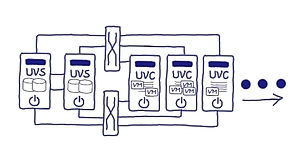
In heutigen Rechenzentren kommt eine Vielzahl von Virtualisierungskonzepten zum Einsatz. OSL führt alle drei Dimensionen der Virtualisierung – Speicher, Netzwerk und Server - in einer durchgängigen Technologie als HCI zusammen. Kern ist die von OSL entwickelte integrierte Speichervirtualisierungs- und Clusterengine, die plattformabstrakt konzipiert und umgesetzt worden ist. Sie erhalten eine wirklich einfach zu handhabende und dennoch herausragend komplette Infrastruktur für den Non-Stop-Betrieb Ihrer VM-Infrastruktur: Dynamisch, virtualisiert und auf offenen Systemen. Dank des softwarezentrierten Designs ist der Einsatz kostengünstig und zukunftssicher auf Hardware ihrer Wahl möglich.


Proxmox VE Documentation Index
Proxmox Server Solutions GmbH
support@proxmox.com
version 8.0.5, Wed Aug 16 10:03:55 UTC 2023

The libvirt project:
- is a toolkit to manage virtualization platforms
- is accessible from C, Python, Perl, Go and more
- is licensed under open source licenses
- supports KVM, Hypervisor.framework, QEMU, Xen, Virtuozzo, VMWare ESX, LXC, BHyve and more
- targets Linux, FreeBSD, Windows and macOS
- is used by many applications

I am running some legacy OSes (Windows 10, …) inside libvirt/KVM virtual machines and since I got my new 4K displays (hello Home Office), I was annoyed that I could not full-screen them on the large displays.
So finally I took some time to investigate and quickly (to my surprise) found the solution. As if we were back in the 1990ties, I did not provide the virtual machine with enough video RAM to properly go to the higher resolutions.
Eliminate the barrier between your machines.
What is it?
Barrier is software that mimics the functionality of a KVM switch, which historically would allow you to use a single keyboard and mouse to control multiple computers by physically turning a dial on the box to switch the machine you're controlling at any given moment. Barrier does this in software, allowing you to tell it which machine to control by moving your mouse to the edge of the screen, or by using a keypress to switch focus to a different system.
Barrier was forked from Symless's Synergy 1.9 codebase. Synergy was a commercialized reimplementation of the original CosmoSynergy written by Chris Schoeneman.
At the moment, barrier is not compatible with synergy. Barrier needs to be installed on all machines that will share keyboard and mouse.
What's different?
Whereas Synergy has moved beyond its goals from the 1.x era, Barrier aims to maintain that simplicity. Barrier will let you use your keyboard and mouse from one computer to control one or more other computers. Clipboard sharing is supported. That's it.
This guide shows how to provision and manage remote Docker Hosts with Docker Machine on your OpenNebula cloud.
About virt-manager’s supporting tools
virt-install is a command line tool which provides an easy way to provision operating systems into virtual machines.
virt-viewer is a lightweight UI interface for interacting with the graphical display of virtualized guest OS. It can display VNC or SPICE, and uses libvirt to lookup the graphical connection details.
virt-clone is a command line tool for cloning existing inactive guests. It copies the disk images, and defines a config with new name, UUID and MAC address pointing to the copied disks.
virt-xml is a command line tool for easily editing libvirt domain XML using virt-install’s command line options.
virt-convert is a command line tool for converting OVF and VMX VM configurations to run with libvirt.
virt-bootstrap is a command tool providing an easy way to setup the root file system for libvirt-based containers.
The SPICE protocol supports guests with more than one monitor. Windows guests and Linux guests behave somewhat differently, so they need to be configured in slightly different ways.
Documentation to set up a simple macOS VM in QEMU, accelerated by KVM.
By @FoxletFox, and the help of many others. Find this useful? You can donate on Coinbase or Paypal!.
New to macOS and KVM? Check the FAQs.
Just a note to myself since I searched the internet for a long time to make this work…
I needed to test a really trivial change to the scsi tape driver code, but didn’t want to reboot an actual machine that has a tape drive. So I thought, maybe QEMU can pass-through an arbitrary device?
General note concerning the use of guest agent interfaces:
"unsupported" is a higher-level error than the errors that individual commands might document. The caller should always be prepared to receive QERR_UNSUPPORTED, even if the given command doesn’t specify it, or doesn’t document any failure mode at all.
tl;dr: this post explains how the new openstack-tempest-ci-live-booter package configures a machine to PXE boot a Debian Live system running on KVM in order to run functional testing of OpenStack. It may be of interest to you if you want to learn how to PXE boot a KVM virtual machine running Debian Live, even if you aren’t interested in OpenStack.
I was in Prague last month for the 2017 edition of the KVM Forum. There I gave a talk about some of the work that I’ve been doing this year to improve the qcow2 file format used by QEMU for storing disk images. The focus of my work is to make qcow2 faster and to reduce its memory requirements.
I was in Prague last month for the 2017 edition of the KVM Forum. There I gave a talk about some of the work that I’ve been doing this year to improve the qcow2 file format used by QEMU for storing disk images. The focus of my work is to make qcow2 faster and to reduce its memory requirements.
There were a couple of QEMU / virtualization related talks at the DevConf 2017 conference that took place at the end of January already, but so far we missed to gather the links to the recordings of these talks. So here is now the list:
Simple yet Powerful Turnkey Solution to Build Clouds and Manage Data Center Virtualization
Over the last two years secure boot support for virtual machines was added to qemu, kvm (linux kernel) and ovmf (edk2/tianocore). This talk covers the implementation details and the issues we had to deal with along the way.