
Have you ever wondered about running Podman in a container: Podman in Podman, Podman in Docker, or even Podman in Kubernetes?
One of the most asked about topics to folks working on upstream container technologies is running Podman within a container. Most of this has historically been related to Docker in Docker (DIND), but now, people also want to run Podman in Podman (PINP) or Podman in Docker (PIND).
But Podman can be run in multiple ways, rootful and rootless. We end up with people wanting to run various combinations of rootful and rootless Podman:
- Rootful Podman in rootful Podman
- Rootless Podman in rootful Podman
- Rootful Podman in rootless Podman
- Rootless Podman in rootless Podman
You get the picture.
This blog will attempt to cover each combination, starting with a discussion of privileges. We'll start with the PINP scenario here in part one. In part two of the series, we'll cover similar ground but do so within the context of Kubernetes. Be sure to read both articles for a complete picture.
Rootless Podman running rootless Podman
$ podman run \
    --security-opt \
    label=disable \
    --user podman \
    --device /dev/fuse \
    quay.io/podman/stable \
    \
    podman run alpine echo hello


ubi8-asciidoctor
A utility image for the UBI8 image + asciidoctor.
Contains the primary used asciidoctor-pdf for generating reports.
It's base is from https://github.com/asciidoctor/docker-asciidoctor but now ubi based.
Purpose
Useful for environments where these libraries/tools are needed such as:
- local development
- CI tools that do not require specific CI tooling configuration, such as GiLab Jobs.
Published
https://quay.io/repository/redhat-cop/ubi8-asciidoctor via GitHub Workflows.
The K10 data management platform, purpose-built for Kubernetes, provides enterprise operations teams an easy-to-use, scalable, and secure system for backup/restore, disaster recovery, and mobility of Kubernetes applications.
K10’s application-centric approach and deep integrations with relational and NoSQL databases, Kubernetes distributions, and all clouds provides teams the freedom of infrastructure choice without sacrificing operational simplicity. Policy-driven and extensible, K10 provides a native Kubernetes API and includes features such full-spectrum consistency, database integrations, automatic application discovery, multi-cloud mobility, and a powerful web-based user interface.
Given K10’s extensive ecosystem support you have the flexibility to choose environments (public/ private/ hybrid cloud/ on-prem) and Kubernetes distributions (cloud vendor managed or self managed) in support of three principal use cases:
-
Application Mobility
-

passt implements a translation layer between a Layer-2 network interface and native Layer-4 sockets (TCP, UDP, ICMP/ICMPv6 echo) on a host. It doesn't require any capabilities or privileges, and it can be used as a simple replacement for Slirp.
Flatcar Container Linux is a container optimized OS that ships a minimal OS image, which includes only the tools needed to run containers. The OS is shipped through an immutable filesystem and includes automatic atomic updates.


mailcow: dockerized is an open source groupware/email suite based on docker.
mailcow relies on many well known and long used components, which in combination result in an all around carefree email server.
Each container represents a single application, connected in a bridged network:

Podman is a daemonless container engine for developing, managing, and running Open Container Initiative (OCI) containers on Linux systems. Included in Red Hat Enterprise Linux 7.6 and later, Podman lets you create and manage rootless containers, which don't require root access to be built and deployed.
Podman is an excellent alternative to Docker containers when you need increased security, unique identifier (UID) separation using namespaces, and integration with systemd.
Download the Podman Cheat Sheet and explore basic commands for managing images, containers, and container resources. You’ll learn how to:
- Work with image repositories
- Build container images
- Create and run containers
- Manage container processes and resources
- Work with a host compiler’s file system
With Red Hat Developer cheat sheets, you get essential information right at your fingertips so you can work faster and smarter. Easily learn new technologies and coding concepts and quickly find the answers you need.

The original Quadlet repository describes Quadlet this way:
What do you get if you squash a Kubernetes kubelet?
A quadlet
Quadlet is a tool for running Podman containers under systemd in an optimal way by allowing containers to run under systemd in a declarative way. It has been merged into Podman 4.4.

Welcome
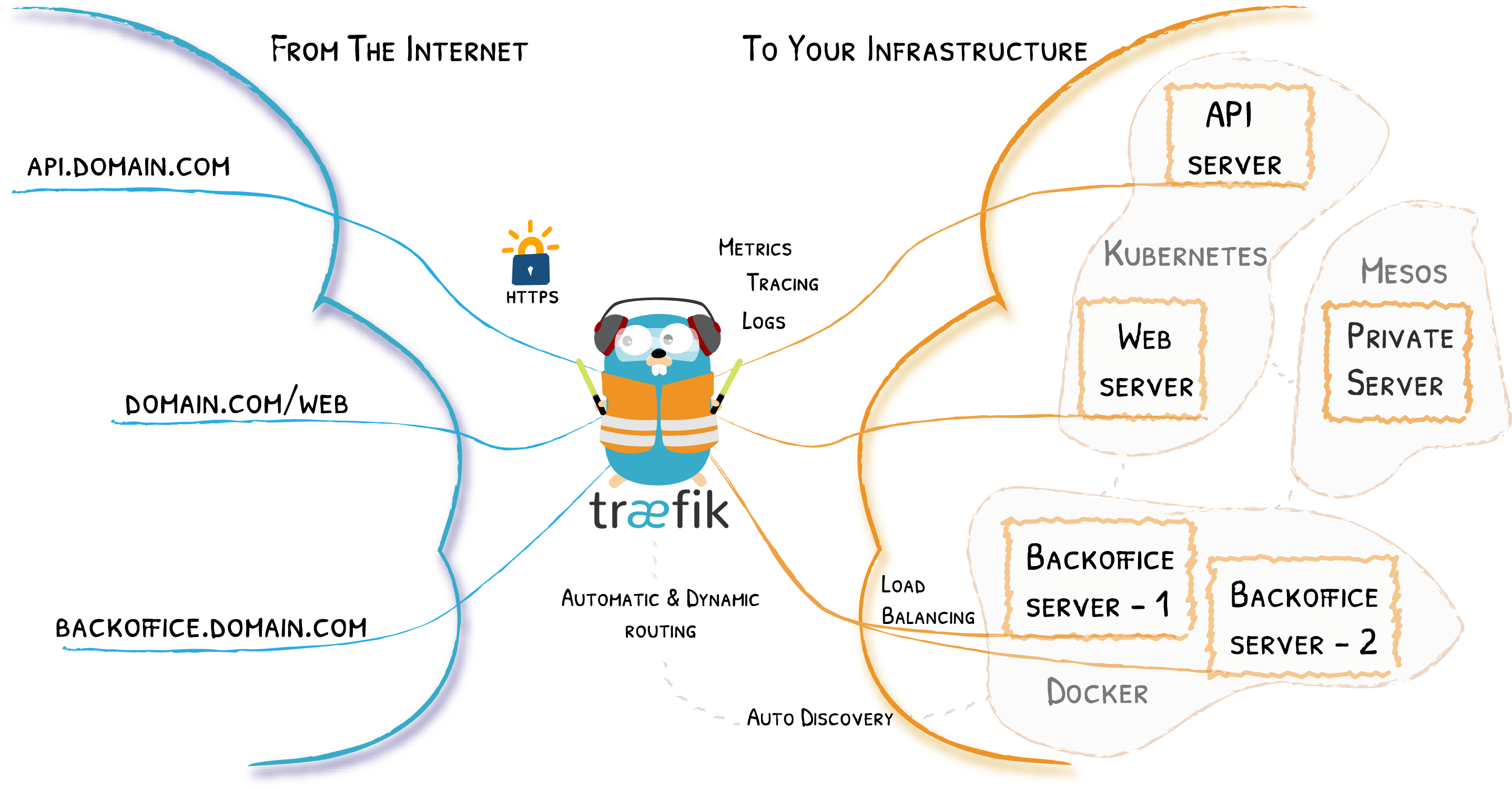
Traefik is an open-source Edge Router that makes publishing your services a fun and easy experience. It receives requests on behalf of your system and finds out which components are responsible for handling them.
What sets Traefik apart, besides its many features, is that it automatically discovers the right configuration for your services. The magic happens when Traefik inspects your infrastructure, where it finds relevant information and discovers which service serves which request.
Traefik is natively compliant with every major cluster technology, such as Kubernetes, Docker, Docker Swarm, AWS, Mesos, Marathon, and the list goes on; and can handle many at the same time. (It even works for legacy software running on bare metal.)
With Traefik, there is no need to maintain and synchronize a separate configuration file: everything happens automatically, in real time (no restarts, no connection interruptions). With Traefik, you spend time developing and deploying new features to your system, not on configuring and maintaining its working state.
Developing Traefik, our main goal is to make it simple to use, and we're sure you'll enjoy it.

Podman uses two different means for its networking stack, depending on whether the container is rootless or rootfull. When rootfull, defined as being run by the root (or equivalent) user, Podman primarily relies on the containernetworking plugins project. When rootless, defined as being run by a regular user, Podman uses the slirp4netns project.
#Networking and Podman pods
By definition, all containers in a Podman pod share the same network namespace. This fact means that they will have the same IP address, MAC addresses, and port mappings. You can conveniently communicate between containers in a pod by using localhost.

It seems once people master the basics of containers, networking is one of the first aspects they begin experimenting with. And regarding networking, it takes very little experimentation before ending up on the deep end of the pool. The following guide shows the most common network setups for Podman rootful and rootless containers. Each setup is supported with an example.

Python bindings and code examples for using Varlink access to Podman Service

Der erste Teil der Artikelserie hat einen grundlegenden Überblick über Podman vermittelt, während der zweite Teil die Bausteine eines Linux-Containers und Sicherheitskonzepte von Podman genau beleuchtete, insbesondere die Ausführung ohne Root. Der dritte und letzte Teil der Artikelserie widmet sich den fortgeschrittenen Anwendungsfällen von Podman, angefangen bei der automatischen Generierung von Systemd-Services bis zur Container-Ausführung auf einem anderen System.

An Ansible AWX operator for Kubernetes built with Operator SDK and Ansible.

Für dieses Tutorial habe ich eine Installation mit Debian 11.1 (Bullseye) verwendet. Auf dem Host existieren die beiden User Alice und Bob, welche für die Nutzung von rootless-Podman vorbereitet werden.
Die Einrichtung von rootless-Podman unter Debian Bullseye
Rootless-Container haben die Eigenschaft, dass sie in User Namespaces (siehe user_namespaces(7) und namespaces(7)) ausgeführt werden. UIDs und GIDs, welche innerhalb des Containers existieren, werden dabei auf UIDs/GIDs des Hosts abgebildet. So besitzt ein Prozess, welcher innerhalb eines Containers mit der UID 0 (root) läuft, außerhalb des Containers bspw. die UID 165537 und damit die Rechte eines normalen Benutzers.

This Ansible playbook is meant to help you run your own Matrix homeserver, along with the various services related to that.
That is, it lets you join the Matrix network using your own @<username>:<your-domain> identifier, all hosted on your own server (see prerequisites).
We run all services in Docker containers (see the container images we use), which lets us have a predictable and up-to-date setup, across multiple supported distros (see prerequisites) and architectures (x86/amd64 being recommended).
Installation (upgrades) and some maintenance tasks are automated using Ansible (see our Ansible guide).
Kubermatic KubeOne automates cluster operations on all your cloud, on-prem, edge, and IoT environments. It comes as a CLI that allows you to manage the full lifecycle of your clusters, including installing and provisioning, upgrading, repairing, and unprovisioning your Kubernetes clusters.
Flux is a tool that automatically ensures that the state of a cluster matches the config in git. It uses an operator in the cluster to trigger deployments inside Kubernetes, which means you don't need a separate CD tool. It monitors all relevant image repositories, detects new images, triggers deployments and updates the desired running configuration based on that (and a configurable policy).
The benefits are: you don't need to grant your CI access to the cluster, every change is atomic and transactional, git has your audit log. Each transaction either fails or succeeds cleanly. You're entirely code centric and don't need new infrastructure.

Heute läuft der Server mit Ubuntu 20.04. Darauf laufen keine LXC/LXD Container mehr. Stattdessen läuft jetzt Kubernetes darauf. Zu Beginn nutzte ich für die Installation von Kubernetes Kubespray ein, das Standard-Kubernetes war allerdings deutlich zu fett. Größtes Manko war, dass das etcd verdammt viel auf die SSD geschrieben hat und ich regelmäßig bei jedem Upgrade das Setup kaputt gespielt habe. Für den Privatgebrauch ergab das so daher keinen Sinn.
Mittlerweile setze ich auf das vergleichsweise schlanke k3s.io. Das braucht im Heimbetrieb deutlich weniger Leistung und erledigt trotzdem das, was ich brauche. Statt etcd setzt es auf sqlite und statt Docker auf containerd.
This is a plugin for Docker Machine allowing to create docker hosts on OpenNebula. This will allow the deployment of Docker Engines using Docker Machine using OpenNebula as the backend, from a client machine.