Fastbin is a drop in replacement of pycasbin the python implementation of the great authorization management casbin.
Fastbin is designed to address the primary concern when working with large sets of rules; Performance.
The root cause of working with large rule sets is the following: casbin/core_enforcer.py#L238
Iterating over 10,000 rules to get a yes or no answer takes time, there really isn't a way around the fact. This limitation comes from the generalization that casbin attempts to support. Independent on the format of your request, or policy definition casbin if able to support your authorization mechanism.
Fastbin makes a minimal set of assumptions to allow efficient filtering of the model so that the number of rules you are iterating over to get a result is much smaller and performance can be maintained. Using Fastbin when working with rule sets of any size, it is possible to keep resolution of enforcement sub millisecond.

Authorization plays a vital role in building secure and robust applications, ensuring that users possess the necessary permissions to access resources or perform particular actions.
In Python, developers often follow authorization anti-patterns that can potentially lead to security vulnerabilities, needless code complexity, and significant maintenance difficulties. This article examines various best practices to avoid these anti-patterns and provides strategies to implement more effective authorization in your Python applications.
The unittest unit testing framework was originally inspired by JUnit and has a similar flavor as major unit testing frameworks in other languages. It supports test automation, sharing of setup and shutdown code for tests, aggregation of tests into collections, and independence of the tests from the reporting framework.
To achieve this, unittest supports some important concepts in an object-oriented way:
- test fixture
A test fixture represents the preparation needed to perform one or more tests, and any associated cleanup actions. This may involve, for example, creating temporary or proxy databases, directories, or starting a server process. - test case
A test case is the individual unit of testing. It checks for a specific response to a particular set of inputs. unittest provides a base class, TestCase, which may be used to create new test cases. - test suite
A test suite is a collection of test cases, test suites, or both. It is used to aggregate tests that should be executed together. - test runner
A test runner is a component which orchestrates the execution of tests and provides the outcome to the user. The runner may use a graphical interface, a textual interface, or return a special value to indicate the results of executing the tests.
Reference:
- python3 doc: unittest.mock — getting started
- python3 doc: unittest.mock — mock object library
- python3 doc: unittest — Unit testing framework - assert methods
- python3 doc: unittest — Unit testing framework - class unittest.TestCase(methodName='runTest')

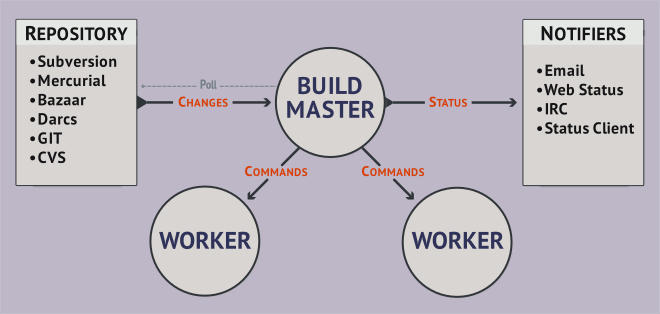
At its core, Buildbot is a job scheduling system: it queues jobs, executes the jobs when the required resources are available, and reports the results.
Your Buildbot installation has one or more masters and a collection of workers. The masters monitor source-code repositories for changes, coordinate the activities of the workers, and report results to users and developers. Workers run on a variety of operating systems.
You configure Buildbot by providing a Python configuration script to the master. This script can be very simple, configuring built-in components, but the full expressive power of Python is available. This allows dynamic generation of configuration, customized components, and anything else you can devise.
The framework itself is implemented in Twisted Python, and compatible with all major operating systems.

Testing applications has become a standard skill set required for any competent developer today. The Python community embraces testing, and even the Python standard library has good inbuilt tools to support testing. In the larger Python ecosystem, there are a lot of testing tools. Pytest stands out among them due to its ease of use and its ability to handle increasingly complex testing needs.


Python environment tools for Visual Studio Code
Performant Python environment tooling and support, such as locating all global Python installs and virtual environments.
Environment Types Supported
- python.org
- Windows Store
- PyEnv
- PyEnv-Win
- PyEnv-Virtualenv
- Conda
- Miniconda
- Miniforge
- PipEnv
- Homebrew
- VirtualEnvWrapper
- VirtualEnvWrapper-Win
- Venv
- VirtualEnv
- Python on your PATH
Features
- Discovery of all global Python installs
- Discovery of all Python virtual environments
diceware is a passphrase generator following the proposals of Arnold G. Reinhold on http://diceware.com . It generates passphrases by concatenating words randomly picked from wordlists.
](http://imgs.xkcd.com/comics/password_strength.png)

iLO automation from python or shell
HP servers come with a powerful out of band management interface called Integrated Lights out, or iLO. It has an extensive web interface and commercially available tools for centrally managing iLO devices and their servers.
But if you want to built your own tooling, integrate iLO management to your existing procedures or simply want to manage iLOs using a command-line interface, you're stuck manually creating XML files and using a perl hack HP ships called locfg.pl.
Enter python-hpilo!
Using the same XML interface as HP's own management tools, here is a python library and command-line tool that make it a lot easier to do all the above. No manual XML writing, just call functions from either python or your shell(script).

Based on a discussion on IRC and Mastodon: “How can I get access to the return values of my (Python-) programs functions?” And more generally, how can I trace function execution in Python, showing function parameters and return values?
- decorator
- autologging
- icecream
- snoop and birdseye
- peepshow, a commandline debugger
- Honeycomb and Opentracing


The main branch is currently the future Python 3.12, and is the only branch that accepts new features. The latest release for each Python version can be found on the download page.
The pytest framework makes it easy to write small, readable tests, and can scale to support complex functional testing for applications and libraries.
pytest requires: Python 3.7+ or PyPy3.

In this tutorial, you’ll learn how to quickly build documentation for a Python package using MkDocs and mkdocstrings. These tools allow you to generate nice-looking and modern documentation from Markdown files and your code’s docstrings.
Maintaining auto-generated documentation means less effort because you’re linking information between your code and the documentation pages. However, good documentation is more than just the technical description pulled from your code! Your project will appeal more to users if you guide them through examples and connect the dots between the docstrings.
The Material for MkDocs theme makes your documentation look good without any extra effort and is used by popular projects such as Typer CLI and FastAPI.
There are several different docstring formats which one can use in order to enable Sphinx’s autodoc extension to automatically generate documentation. For this tutorial we will use the Sphinx format, since, as the name suggests, it is the standard format used with Sphinx. Other formats include Google (see here) and NumPy (see here), but they require the use of Sphinx’s napoleon extension, which is beyond the scope of this tutorial.
All currently supported Python versions (3.6+) support string-formatting via f-strings. While PEP 498 (Literal String Interpolation) as well as the Python documention (tutorial, syntax reference) have some information on their usage, I was missing a reference which is terse, but still verbose enough to explain the syntax.
This is the home of Pygments. It is a generic syntax highlighter suitable for use in code hosting, forums, wikis or other applications that need to prettify source code. Highlights are:

-
a wide range of 547 languages and other text formats is supported
-
special attention is paid to details that increase highlighting quality
-
support for new languages and formats are added easily; most languages use a simple regex-based lexing mechanism
-
a number of output formats is available, among them HTML, RTF, LaTeX and ANSI sequences
-
it is usable as a command-line tool and as a library
This extension allows you to embed Graphviz graphs in your documents.
Markdown is a lightweight markup language with a simplistic plain text formatting syntax. It exists in many syntactically different flavors. To support Markdown-based documentation, Sphinx can use MyST-Parser. MyST-Parser is a Docutils bridge to markdown-it-py, a Python package for parsing the CommonMark Markdown flavor.
Sphinx makes it easy to create intelligent and beautiful documentation.
Here are some of Sphinx’s major features:
-
Output formats: HTML (including Windows HTML Help), LaTeX (for printable PDF versions), ePub, Texinfo, manual pages, plain text
-
Extensive cross-references: semantic markup and automatic links for functions, classes, citations, glossary terms and similar pieces of information
-
Hierarchical structure: easy definition of a document tree, with automatic links to siblings, parents and children
-
Automatic indices: general index as well as a language-specific module indices
-
Code handling: automatic highlighting using the Pygments highlighter
-
Extensions: automatic testing of code snippets, inclusion of docstrings from Python modules (API docs) via built-in extensions, and much more functionality via third-party extensions.
-
Themes: modify the look and feel of outputs via creating themes, and re-use many third-party themes.
-
Contributed extensions: dozens of extensions contributed by users; most of them installable from PyPI.
Sphinx uses the reStructuredText markup language by default, and can read MyST markdown via third-party extensions. Both of these are powerful and straightforward to use, and have functionality for complex documentation and publishing workflows. They both build upon Docutils to parse and write documents.
Atlassian® Confluence® Builder for Sphinx is a community provided extension to help build Confluence supported format files (e.g. storage format) and publish them to a Confluence instance.
License: BSD-2-Clause
Confluence Cloud / Server 7.8+
Python 2.7 or 3.7+
Sphinx 1.8 or 4.1+
The community and development for this extension can all be found at this project's GitHub repository:
Atlassian Confluence Builder for Sphinx - GitHub
https://github.com/sphinx-contrib/confluencebuilder
Peewee is a simple and small ORM. It has few (but expressive) concepts, making it easy to learn and intuitive to use.
a small, expressive ORM
- python 2.7+ and 3.4+ (developed with 3.6)
- supports sqlite, mysql, postgresql and cockroachdb
- tons of extensions
- Peewee’s source code hosted on GitHub.