Kea is the next generation of DHCP software, developed by Internet Systems Consortium (ISC). It supports both the DHCPv4 and DHCPv6 protocols along with their extensions, e.g. prefix delegation and dynamic updates to DNS.
This guide covers Kea version 2.7.1-git.




EOS is an open-source storage software solution to manage Exabyte storage for the CERN Large Hadron Collidor LHC. Core of the implementation is the XRootD framework providing a feature-rich remote access protocol.


mailcow: dockerized is an open source groupware/email suite based on docker.
mailcow relies on many well known and long used components, which in combination result in an all around carefree email server.
Each container represents a single application, connected in a bridged network:

GnuPG is a tool for secure communication. This chapter is a quick-start guide that covers the core functionality of GnuPG. This includes keypair creation, exchanging and verifying keys, encrypting and decrypting documents, and authenticating documents with digital signatures. It does not explain in detail the concepts behind public-key cryptography, encryption, and digital signatures. This is covered in Chapter 2. It also does not explain how to use GnuPG wisely. This is covered in Chapters 3 and 4.
GnuPG uses public-key cryptography so that users may communicate securely. In a public-key system, each user has a pair of keys consisting of a private key and a public key. A user's private key is kept secret; it need never be revealed. The public key may be given to anyone with whom the user wants to communicate. GnuPG uses a somewhat more sophisticated scheme in which a user has a primary keypair and then zero or more additional subordinate keypairs. The primary and subordinate keypairs are bundled to facilitate key management and the bundle can often be considered simply as one keypair.
This manual documents how to use the GNU Privacy Guard system as well as the administration and the architecture.


ansible-navigator is a command-line tool and a text-based user interface (TUI) for creating, reviewing, running and troubleshooting Ansible content, including inventories, playbooks, collections, documentation and container images (execution environments).
A demo of the interface can be found on YouTube.
To learn how to easily start leveraging the container technology with ansible-navigator, see the Getting started with Execution Environments guide.
- Installation
- Settings
- Subcommands
- FAQ
Contributions
- Code Of Conduct
- Security
- Guidelines


Proxmox VE Documentation Index
Proxmox Server Solutions GmbH
support@proxmox.com
version 8.0.5, Wed Aug 16 10:03:55 UTC 2023
Thoroughly detailed information and continually updated instructions on how to best operate pfSense® software.

The Settings editor is the UI that lets you review and modify setting values that are stored in a settings.json file. You can review and edit this file directly by opening it in the editor with the Preferences: Open Settings (JSON) command. Settings are written as JSON by specifying the setting ID and value.

PuTTY is a free (MIT-licensed) Windows Telnet and SSH client. This manual documents PuTTY, and its companion utilities PSCP, PSFTP, Plink, Pageant and PuTTYgen.
Note to Unix users: this manual currently primarily documents the Windows versions of the PuTTY utilities. Some options are therefore mentioned that are absent from the Unix version; the Unix version has features not described here; and the pterm and command-line puttygen and pageant utilities are not described at all. The only Unix-specific documentation that currently exists is the man pages.
This manual is copyright 1997-2022 Simon Tatham. All rights reserved. You may distribute this documentation under the MIT licence. See appendix D for the licence text in full.

Gitea is a painless self-hosted Git service. It is similar to GitHub, Bitbucket, and GitLab. Gitea is a fork of Gogs. See the Gitea Announcement blog post to read about the justification for a fork.

The Concepts section helps you learn about the parts of the Kubernetes system and the abstractions Kubernetes uses to represent your cluster, and helps you obtain a deeper understanding of how Kubernetes works.
Ansible is an IT automation tool. It can configure systems, deploy software, and orchestrate more advanced IT tasks such as continuous deployments or zero downtime rolling updates.
Ansible’s main goals are simplicity and ease-of-use. It also has a strong focus on security and reliability, featuring a minimum of moving parts, usage of OpenSSH for transport (with other transports and pull modes as alternatives), and a language that is designed around auditability by humans–even those not familiar with the program.
We believe simplicity is relevant to all sizes of environments, so we design for busy users of all types: developers, sysadmins, release engineers, IT managers, and everyone in between. Ansible is appropriate for managing all environments, from small setups with a handful of instances to enterprise environments with many thousands of instances.
You can learn more at AnsibleFest, the annual event for all Ansible contributors, users, and customers hosted by Red Hat. AnsibleFest is the place to connect with others, learn new skills, and find a new friend to automate with.
Ansible manages machines in an agent-less manner. There is never a question of how to upgrade remote daemons or the problem of not being able to manage systems because daemons are uninstalled. Also, security exposure is greatly reduced because Ansible uses OpenSSH — the open source connectivity tool for remote login with the SSH (Secure Shell) protocol.
Ansible is decentralized–it relies on your existing OS credentials to control access to remote machines. And if needed, Ansible can easily connect with Kerberos, LDAP, and other centralized authentication management systems.
This documentation covers the version of Ansible noted in the upper left corner of this page. We maintain multiple versions of Ansible and the Ansible documentation, so please be sure you are using the documentation version that covers the version of Ansible you are using. For recent features, we note the version of Ansible where the feature was added.
Ansible releases a new major release approximately twice a year. The core application evolves somewhat conservatively, valuing simplicity in language design and setup. Contributors develop and change modules and plugins hosted in collections since version 2.10 much more quickly.
Welcome
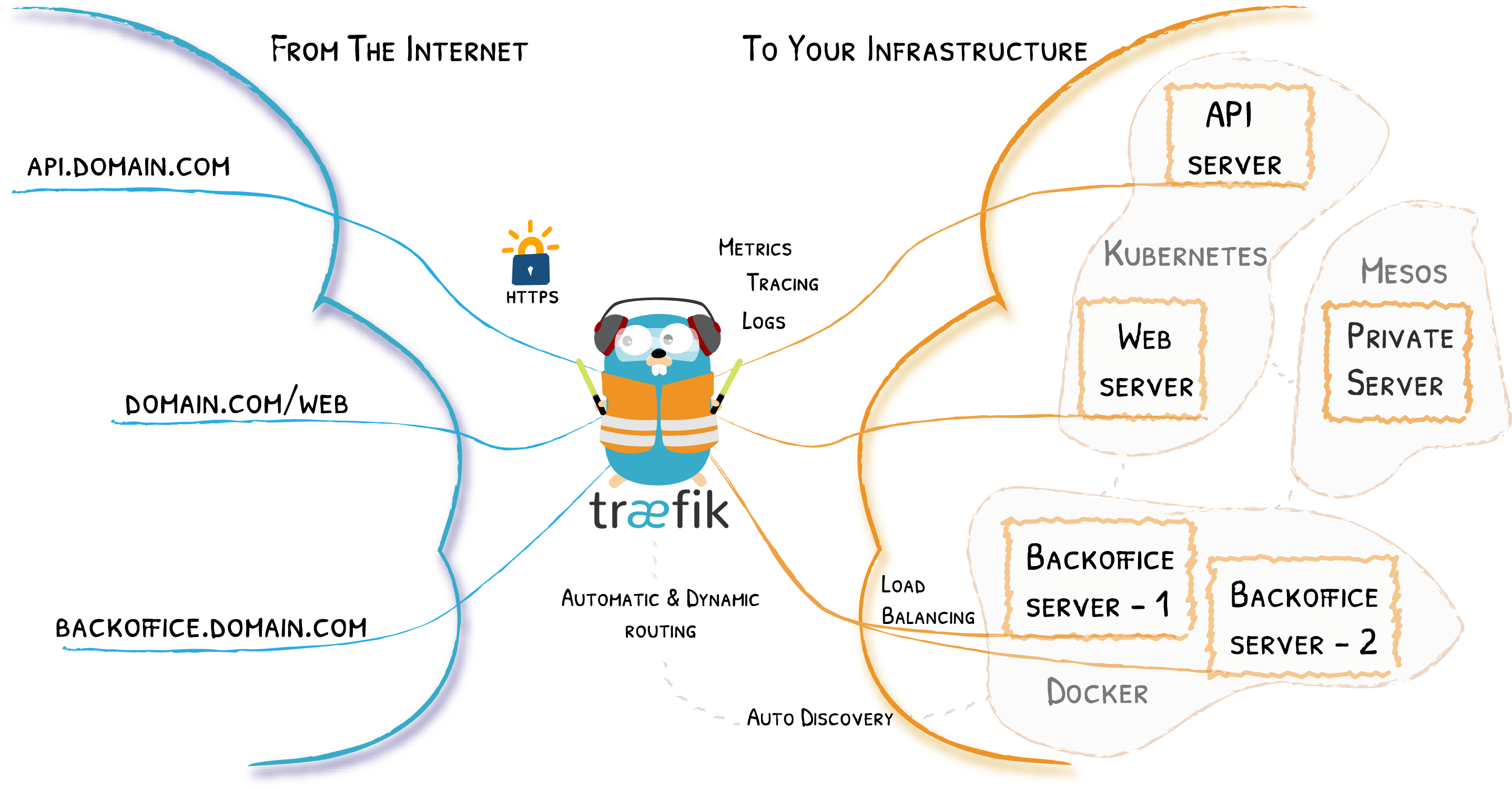
Traefik is an open-source Edge Router that makes publishing your services a fun and easy experience. It receives requests on behalf of your system and finds out which components are responsible for handling them.
What sets Traefik apart, besides its many features, is that it automatically discovers the right configuration for your services. The magic happens when Traefik inspects your infrastructure, where it finds relevant information and discovers which service serves which request.
Traefik is natively compliant with every major cluster technology, such as Kubernetes, Docker, Docker Swarm, AWS, Mesos, Marathon, and the list goes on; and can handle many at the same time. (It even works for legacy software running on bare metal.)
With Traefik, there is no need to maintain and synchronize a separate configuration file: everything happens automatically, in real time (no restarts, no connection interruptions). With Traefik, you spend time developing and deploying new features to your system, not on configuring and maintaining its working state.
Developing Traefik, our main goal is to make it simple to use, and we're sure you'll enjoy it.

Lightweight Kubernetes. Easy to install, half the memory, all in a binary of less than 100 MB.
Great for:
- Edge
- IoT
- CI
- Development
- ARM
- Embedding K8s
- Situations where a PhD in K8s clusterology is infeasible
management user interface
- Manual section: 1
- Manual group: Virtualization Support


-
Deployment / operation
- Applications - Applications known to use libvirt
- Manual pages - Manual pages for libvirt tools / daemons
- Windows - Downloads for Windows
- macOS - Working with libvirt on macOS
- Migration - Migrating guests between machines
- Daemons - Overview of the daemons provided by libvirt
- Remote access - Enable remote access over TCP
- TLS certs - Generate and deploy x509 certificates for TLS
- Authentication - Configure authentication for the libvirt daemon
- Access control - Configure access control libvirt APIs with polkit
- Logging - The library and the daemon logging support
- Audit log - Audit trail logs for host operations
- Firewall - Firewall and network filter configuration
- Hooks- Hooks for system specific management
- NSS module - Enable domain host name translation to IP addresses
- FAQ - Frequently asked questions
-
Application development
- API Reference
- ...
-
Project development
- ...
- API concepts
- ...