
pyinfra is a python-native, agentless automation tool that runs commands over ssh — concurrently, idempotently, and 6× faster than ansible.


Ansible can be used in many ways: most people likely execute their playbooks on their local machines. Then there is Ansible Automation Platform (AAP) (formerly Ansible Tower) and its small brother AWX. Both are the standard in larger organizations to allow for a more controlled way of running Ansible playbooks and offer RBAC capabilities. These two are also really “heavy” and require a lot of resources to run. Since some time both also require a Kubernetes backend.
These facts are not attractive for homelabs or other small-scale use cases. Luckily, Semaphore exists, which is a project aiming to provide a lightweight alternative to AAP. Maybe there are also even more alternatives, yet I was not able to find any others when researching the topic until today.

With ansible-builder you can configure and build portable, consistent, customized Ansible control nodes that are packaged as containers by Podman or Docker. These containers are known as execution environments. You can use them on AWX or Ansible Controller, with Ansible Navigator, for local playbook development and testing, in your CI pipelines, and anywhere else you run automation.
You can design and distribute specialized execution environments for your Ansible content, choosing the versions of Python and ansible-core you want, and installing only the Python packages, system packages, and Ansible collections you need for your tasks.

Ansible Runner is a tool and python library that helps when interfacing with Ansible directly or as part of another system whether that be through a container image interface, as a standalone tool, or as a Python module that can be imported. The goal is to provide a stable and consistent interface abstraction to Ansible. This allows Ansible to be embedded into other systems that don’t want to manage the complexities of the interface on their own (such as CI/CD platforms, Jenkins, or other automated tooling).
Topics

A environment management tool for Ansible content development that provides isolated workspaces for development. ansible-dev-environment (ade) manages virtual environments, collection installation and removal, and Python dependency resolution to ensure consistent, reproducible development environments.
Overview
ansible-dev-environment (ade) provides comprehensive collection development environment management by:
- Creating isolated virtual environments
- Installing and removing collections with full dependency tracking
- Resolving and installing collection Python dependencies from requirements.txt and test-requirements.txt
- Installing collections in editable mode with symlinks for active development
- Managing development dependencies like ansible-dev-tools
- Providing configurable workspace isolation
While ansible-galaxy efficiently manages collection installation and dependencies, it does not handle Python package dependencies that collections may require. ade complements this by ensuring all Python requirements are properly managed within isolated environments.
Collections are installed into Python's site-packages directory, making them discoverable by both Ansible and Python tooling including pytest.
This table links to the changelogs for each major ansible-core release. These changelogs contain the dates and significant changes in each minor release. Dates listed indicate the start date of the maintenance cycle.
This role installs and manages gitea or forgejo. A painless self-hosted Git service. Gitea is a community managed lightweight code hosting solution written in Go. Forgejo is a fork of it. Source code & screenshots gitea. Source code forgejo. This role is also Part of the Ansible-Collection l3d.git.


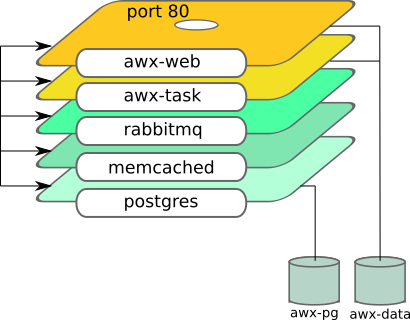
This Ansible role sets up Ansible AWX server using containers. It uses podman to do it.
See this blog how to use it: Automate Podman Containers with Ansible 2/2
Role dependency



Multiple rules may be added based on the requirements. Adding a new rule should combine implementation, testing and documentation.

This package provides tooling for validating and building Ansible documentation. It mainly consists of a CLI tool, antsibull-docs, and a Sphinx extension. The main output format are reStructured Text (RST) files for consumption by Sphinx.
- Ansible documentation style guide
- antsibull-docs – Ansible Documentation Build Scripts: Creating a collection docsite
Expand your automation to a virtually unlimited set of use cases.

This repo contains branding assets for the AWX project. You may use these assets provided you agree to, and strictly adhere to, our trademark guidelines.
For instructions on how to incorporate these assets into the AWX build process, please view the installation guide.

Introduction
Ansible Development Tools or ADT for short, aims to streamline the setup and usage of several tools needed to create Ansible content. When it comes to creating automation content using Ansible, there are several packages available that can help users in different parts of the content-creating journey. From bootstrapping new projects, all the way to ensuring content follows best practices and verifying it behaves as intended via well-established test frameworks.
Key Features
-
All-in-One Ansible Toolkit: ansible-dev-tools combines critical Ansible development packages into a unified Python package called ansible-dev-tools.
-
Simplified Ansible Automation: ansible-dev-tools focuses on crafting your automation scenarios and workflows with speed by reducing boilerplate code without dealing with the intricacies of managing and integrating different Ansible libraries.
For those looking for an IDE-based experience, we also recommend you get familiar with the Ansible extension for VSCode.
Since I've set this up a number of times, but I just realized I've never documented it on my blog, I thought I'd finally do that.
I have a set of servers that are running on a private network. That network is connected to the Internet through a single reverse proxy / 'bastion' host.
But I still want to be able to manage the servers on the private network behind the bastion from outside.
Ansible offers two ways to reuse files and roles in a playbook: dynamic and static.
-
For reuse, add an include_* task in the tasks section of a play:
- include_role
- include_tasks
- include_vars
-
For static reuse, add an import_* task in the tasks section of a play:
- import_role
- import_tasks
Task include and import statements can be used at arbitrary depth.
You can still use the bare roles keyword at the play level to incorporate a role in a playbook statically. However, the bare include keyword, once used for both task files and playbook-level includes, is now deprecated.
ansible-navigator is a command-line tool and a text-based user interface (TUI) for creating, reviewing, running and troubleshooting Ansible content, including inventories, playbooks, collections, documentation and container images (execution environments).
A demo of the interface can be found on YouTube.
To learn how to easily start leveraging the container technology with ansible-navigator, see the Getting started with Execution Environments guide.
- Installation
- Settings
- Subcommands
- FAQ
Contributions
- Code Of Conduct
- Security
- Guidelines

Recommended practices for all elements of automation using Ansible, starting with collections and roles, continuing with playbooks, inventories and plug-ins... These good practices are planned to be used by all Red Hat teams interested but can of course be used by others.
Ansible is simple, flexible, and powerful. Like any powerful tool, there are many ways to use it, some better than others.
This document aims to gather good practices from the field of Ansible practitioners at Red Hat, consultants, developers, and others. And thus it strives to give any Red Hat employee, partner or customer (or any Ansible user) a guideline from which to start in good conditions their automation journey.
Those are opinionated guidelines based on the experience of many people. They are not meant to be followed blindly if they don’t fit the reader’s specific use case, organization or needs; there is a reason why they are called good and not best practices.
The reader of this document is expected to have working practice of Ansible. If they are new to Ansible, the Getting started section of the official Ansible documentation is a better place to start.

Molecule project is designed to aid in the development and testing of Ansible roles.
Molecule provides support for testing with multiple instances, operating systems and distributions, virtualization providers, test frameworks and testing scenarios.
Molecule encourages an approach that results in consistently developed roles that are well-written, easily understood and maintained.
Molecule supports only the latest two major versions of Ansible (N/N-1), meaning that if the latest version is 2.9.x, we will also test our code with 2.8.x.
Once installed, the command line can be called using any of the methods below:
molecule ...
python3 -m molecule ... # python module calling methodAnsible is an IT automation tool. It can configure systems, deploy software, and orchestrate more advanced IT tasks such as continuous deployments or zero downtime rolling updates.
Ansible’s main goals are simplicity and ease-of-use. It also has a strong focus on security and reliability, featuring a minimum of moving parts, usage of OpenSSH for transport (with other transports and pull modes as alternatives), and a language that is designed around auditability by humans–even those not familiar with the program.
We believe simplicity is relevant to all sizes of environments, so we design for busy users of all types: developers, sysadmins, release engineers, IT managers, and everyone in between. Ansible is appropriate for managing all environments, from small setups with a handful of instances to enterprise environments with many thousands of instances.
You can learn more at AnsibleFest, the annual event for all Ansible contributors, users, and customers hosted by Red Hat. AnsibleFest is the place to connect with others, learn new skills, and find a new friend to automate with.
Ansible manages machines in an agent-less manner. There is never a question of how to upgrade remote daemons or the problem of not being able to manage systems because daemons are uninstalled. Also, security exposure is greatly reduced because Ansible uses OpenSSH — the open source connectivity tool for remote login with the SSH (Secure Shell) protocol.
Ansible is decentralized–it relies on your existing OS credentials to control access to remote machines. And if needed, Ansible can easily connect with Kerberos, LDAP, and other centralized authentication management systems.
This documentation covers the version of Ansible noted in the upper left corner of this page. We maintain multiple versions of Ansible and the Ansible documentation, so please be sure you are using the documentation version that covers the version of Ansible you are using. For recent features, we note the version of Ansible where the feature was added.
Ansible releases a new major release approximately twice a year. The core application evolves somewhat conservatively, valuing simplicity in language design and setup. Contributors develop and change modules and plugins hosted in collections since version 2.10 much more quickly.

This project provides a Pygments lexer that is able to handle Ansible output. It may be used anywhere Pygments is integrated. The lexer is registered globally under the name ansible-output.
It also provides a Pygments style for tools needing to highlight code snippets.
The code is licensed under the terms of the BSD 2-Clause license.