This role installs and manages gitea or forgejo. A painless self-hosted Git service. Gitea is a community managed lightweight code hosting solution written in Go. Forgejo is a fork of it. Source code & screenshots gitea. Source code forgejo. This role is also Part of the Ansible-Collection l3d.git.


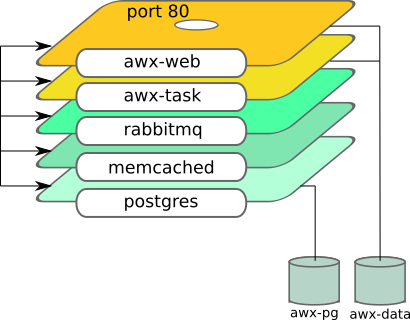
This Ansible role sets up Ansible AWX server using containers. It uses podman to do it.
See this blog how to use it: Automate Podman Containers with Ansible 2/2
Role dependency



Setting up a new machine is time-consuming, and becomes complicated when it needs to be done remotely. If you're installing NixOS, the nixos-anywhere tool allows you to pre-configure the whole process including:
- Disk partitioning and formatting
- Configuring and installing NixOS
- Installing additional files and software
You can then initiate an unattended installation with a single CLI command. Since nixos-anywhere can access the new machine using SSH, it's ideal for remote installations.
Once you have initiated the command, there is no need to 'babysit' the installation. It all happens automatically.
You can use the stored configuration to repeat the same installation if you need to.

Assumptions:
- You’ve Linux experience.
- You’ve installed Java 11 or greater on your Linux machine.
On this page, you’ll learn:
- How to run Kroki
- How to configure Kroki

Pleroma is a free, federated social networking server built on open protocols. It is compatible with GNU Social, Mastodon, and many other ActivityPub implementations.
Even though the product name ‘ODROID’ is a portmanteau of ‘open’ + ‘Android’, the hardware isn't actually fully open source because some parts of the design are still retained proprietary by the Hardkernel company or by ARM itself, such as the graphics drivers. As a home media center this line of boards offers a very cheap HTPC clients that as a media player in many cases works better than similar devices like the Raspberry Pi series.
The best option for Kodi is to use the LibreELEC distribution made by user wrxtasy at the Hardkernel Forums. However the official Ubuntu image from HardKernel also includes a modified version of Kodi (though often outdated and can not be easily updated).

An Ansible AWX operator for Kubernetes built with Operator SDK and Ansible.

This article provides you a simple solution of how to setup a Kubernetes on multiple nodes using a tool called Ansible.
I really had no idea what I was getting into when I decided to build a Kubernetes Pi cluster, or if it would even work. The response on Twitter was absolutely overwhelming and flattering too! As promised, I've decided to document my findings so that anyone/everyone can enjoy the same setup.
So you’ve just rented a new server, in some random data center, from one of the popular hosting providers. You don’t have physical access to the machine, but you rely on your data to be stored securely on the server. You probably want to encrypt the entire system, even the swap partition. The server needs to be able to decrypt the filesystems to boot, but you don’t want the encryption key to be accessible by it, so nobody with physical access can access your data or even tamper with it.
A couple of days ago an interesting step-by-step guide on how to install Debian with full disk encryption, including /boot, using debian-installer was posted on the debian-boot mailinglist. This reminded me of the steps I used and wrote down a couple of month ago to create a similar setup. These steps describe a full disk (including /boot) encrypted setup on a non coreboot enabled system using the great grml live distro. (And just to be sure I just redid the same setup on a test device with the newest grml release Gnackwatschn):
If you have questions, join us on the kubernetes slack, channel #kubespray.
- Can be deployed on AWS, GCE, Azure, OpenStack, vSphere, Oracle Cloud Infrastructure (Experimental), or Baremetal
- Highly available cluster
- Composable (Choice of the network plugin for instance)
- Supports most popular Linux distributions
- Continuous integration tests
Add-ons extend the functionality of Kubernetes.
This page lists some of the available add-ons and links to their respective installation instructions.
Add-ons in each section are sorted alphabetically - the ordering does not imply any preferential status.
kubeadm helps you bootstrap a minimum viable Kubernetes cluster that conforms to best practices. With kubeadm, your cluster should pass Kubernetes Conformance tests. Kubeadm also supports other cluster lifecycle functions, such as upgrades, downgrade, and managing bootstrap tokens.
Because you can install kubeadm on various types of machine (e.g. laptop, server, Raspberry Pi, etc.), it’s well suited for integration with provisioning systems such as Terraform or Ansible.
kubeadm’s simplicity means it can serve a wide range of use cases:
New users can start with kubeadm to try Kubernetes out for the first time.
Users familiar with Kubernetes can spin up clusters with kubeadm and test their applications.
Larger projects can include kubeadm as a building block in a more complex system that can also include other installer tools.
kubeadm is designed to be a simple way for new users to start trying Kubernetes out, possibly for the first time, a way for existing users to test their application on and stitch together a cluster easily, and also to be a building block in other ecosystem and/or installer tool with a larger scope.
You can install kubeadm very easily on operating systems that support installing deb or rpm packages. The responsible SIG for kubeadm, SIG Cluster Lifecycle, provides these packages pre-built for you, but you may also on other OSes.
There are multiple ways to run a Kubernetes cluster with Ubuntu. These pages explain how to deploy Kubernetes on Ubuntu on multiple public and private clouds, as well as bare metal.
Three weeks ago I blogged about how to get rid of non-free Google services and moving to free software on my Android phone. I’ve got a lot of feedback via email, lwn, and Google+, many thanks to all of you for helpful hints! As this is obviously important to many people, I want to tie up some lose ends and publish the results of these discussions.
Foreman is a complete lifecycle management tool for physical and virtual servers. We give system administrators the power to easily automate repetitive tasks, quickly deploy applications, and proactively manage servers, on-premise or in the cloud.
Provision from anywhere
Bare metal, Amazon EC2, Google Compute Engine, OpenStack, Libvirt, oVirt, VMware, and many other providers allow you to manage a hybrid cloud through Foreman
Configuration
An external node classifier, hiera-like parameters, and reports monitoring for Puppet, Salt and Chef are included. Completely ready to tweak host groups in your data center.

General support for:
- Monitors
- OSDs
- MDSs
- RGW
More details:
- Authentication (cephx), this can be disabled.
- Supports cluster public and private network.
- Monitors deployment. You can easily start with one monitor and then progressively add new nodes.
So can deploy one monitor for testing purpose. For production, I recommend to always use an odd
number of monitors, 3 tends to be the standard. - Object Storage Daemons. Like the monitors you can start with a certain amount of nodes and then
grow this number. The playbook either supports a dedicated device for storing the journal or both
journal and OSD data on the same device (using a tiny partition at the beginning of the device). - Metadata daemons.
- Collocation. The playbook supports collocating Monitors, OSDs and MDSs on the same machine.
- The playbook was validated on Debian Wheezy, Ubuntu 12.04 LTS and CentOS 6.4.
- Tested on Ceph Dumpling and Emperor.
- A rolling upgrade playbook was written, an upgrade from Dumpling to Emperor was performed and worked.
Why Kargo?
Making Kubernetes operationally strong is a widely held priority and I track many deployment efforts around the project. The incubated Kargo project is of particular interest for me because it uses the popular Ansible toolset to build robust, upgradable clusters on both cloud and physical targets. I believe using tools familiar to operators grows our community.
These instructions will walk you through booting Container Linux via iPXE on real or virtual hardware. By default, this will run Container Linux completely out of RAM. Container Linux can also be installed to disk.
A mininum of 1024M of RAM is required to boot Container Linux via PXE.