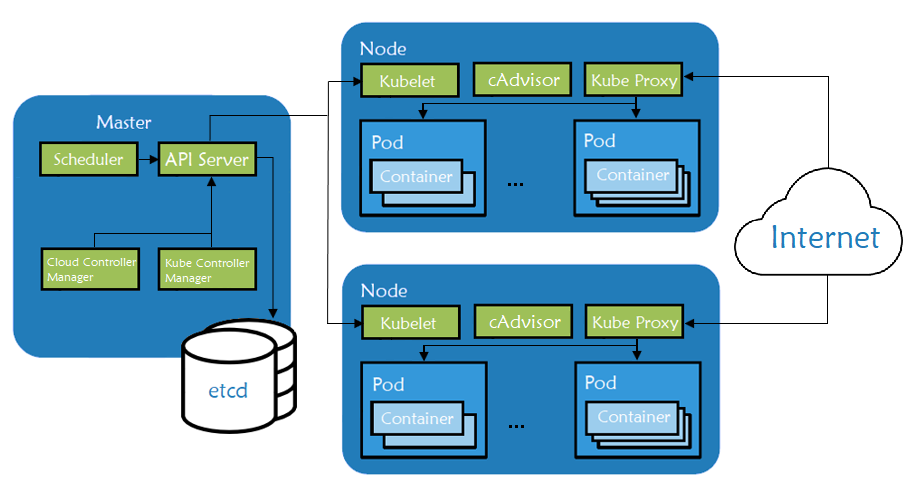
Kubernetes is an open-source orchestration engine for automating deployments, scaling, managing, and providing the infrastructure to host containerized applications. At the infrastructure level, a Kubernetes cluster is comprised of a set of physical or virtual machines, each acting in a specific role.
The master machines act as the brain of all operations and are charged with orchestrating containers that run on all of the node machines. Each node is equipped with a container runtime. The node receives instruction from the master and then takes actions to either create pods, delete them, or adjust networking rules.

For the longest time, the default branch in most Git repositories was named "master". Fortunately, many people have become aware that this terminology (even more evident in "master/slave") should be replaced! The tech industry should move to a more inclusive, open culture - and removing language like "master/slave" is an important step in this journey.
In the public discussion, a handful of different alternatives for "master" have popped up, "default" and "primary" being some of them. But the most popular term seems to be "main".
This short article will help you rename "master" in your own Git repositories to "main" (or any other term your team has chosen).
git branch -m master main
git push -u origin main
git push origin --delete master
Teammates:
git checkout master
git branch -m master main
git fetch
git branch --unset-upstream
git branch -u origin/mainSome months ago, Shlomi Noah published a series about Service Discovery. In his posts, Shlomi describes many ways for an application to find the master. He also gives detail on how these solutions cope with failover to a slave, including their integration with Orchestrator.
This is a great series, and I recommend its reading for everybody implementing master failover, with or without Orchestrator, and even if you are not fully automating the process yet. Taking a step back, I realized that service discovery is only one of the five parts of a full MySQL Master Failover Strategy, and this post is about these five parts. In some follow-up posts, I might analyze some deployments using the framework presented in this post.
This is the first in a series of posts reviewing methods for MySQL master discovery: the means by which an application connects to the master of a replication tree. Moreover, the means by which, upon master failover, it identifies and connects to the newly promoted master.
These posts are not concerned with the manner by which the replication failure detection and recovery take place. I will share orchestrator specific configuration/advice, and point out where cross DC orchestrator/raft setup plays part in discovery itself, but for the most part any recovery tool such as MHA, replication-manager, severalnines or other, is applicable.
We discuss asynchronous (or semi-synchronous) replication, a classic single-master-multiple-replicas setup. A later post will briefly discuss synchronous replication (Galera/XtraDB Cluster/InnoDB Cluster).
This page explains two different approaches to setting up a highly available Kubernetes cluster using kubeadm:
With stacked masters. This approach requires less infrastructure. etcd members and control plane nodes are co-located.
With an external etcd cluster. This approach requires more infrastructure. The control plane nodes and etcd members are separated.
Your clusters must run Kubernetes version 1.11 or later. You should also be aware that setting up HA clusters with kubeadm is still experimental. You might encounter issues with upgrading your clusters, for example. We encourage you to try either approach, and provide feedback.
Add-ons extend the functionality of Kubernetes.
This page lists some of the available add-ons and links to their respective installation instructions.
Add-ons in each section are sorted alphabetically - the ordering does not imply any preferential status.
kubeadm helps you bootstrap a minimum viable Kubernetes cluster that conforms to best practices. With kubeadm, your cluster should pass Kubernetes Conformance tests. Kubeadm also supports other cluster lifecycle functions, such as upgrades, downgrade, and managing bootstrap tokens.
Because you can install kubeadm on various types of machine (e.g. laptop, server, Raspberry Pi, etc.), it’s well suited for integration with provisioning systems such as Terraform or Ansible.
kubeadm’s simplicity means it can serve a wide range of use cases:
New users can start with kubeadm to try Kubernetes out for the first time.
Users familiar with Kubernetes can spin up clusters with kubeadm and test their applications.
Larger projects can include kubeadm as a building block in a more complex system that can also include other installer tools.
kubeadm is designed to be a simple way for new users to start trying Kubernetes out, possibly for the first time, a way for existing users to test their application on and stitch together a cluster easily, and also to be a building block in other ecosystem and/or installer tool with a larger scope.
You can install kubeadm very easily on operating systems that support installing deb or rpm packages. The responsible SIG for kubeadm, SIG Cluster Lifecycle, provides these packages pre-built for you, but you may also on other OSes.