
This project has an ambitious goal of creating a framework for writing NixOS router configurations - in other words, being the simple-nixos-mailserver of the networking world, but without the "simple" part, because networking is hard. This may include complex features like running multiple DHCP servers, using network namespaces, having interfaces turn on and off while the rest of the system keeps working, etc.


Welcome to the NixOS Router documentation. This guide will help you install, configure, and maintain your NixOS-based router.
Quick Links
- Installation Guide - Get started with installing the router
- Upgrading Guide - Learn how to upgrade your router
- Verification - Verify your router is working correctly
- WebUI Documentation - Learn about the web interface features
- Configuration - Configure all aspects of your router
My home internet connection comes with proper dual-stack support. I get a public IPv4 address via DHCP, a /128 (IA_NA) and a /48 IPv6 prefix (IA_PD) via DHCPv6.
Traditionally you would configure your networking via iproute2 and then fork-off a DHCP client to configure the external addresses.
Usually all of that is being hidden from you through wrappers (like Debian’s ifupdown). The configuration would be set, the daemons fired off and hopefully everything would go well.
The limitations of the system become visible once you have a more dynamic set of interfaces that have to be initialized in some order, some VPN device that depend on the uplink connection etc. While systems like ifupdown have employed hooks of all sorts that you still end up writing a bunch of (inlined) shell scripts that deal with some little details of your setup. Adding sleep statements at worst. Things get tricky when one interface going up changes things on another interface or even system wide (think sysctl, iptables, starting a VPN daemon, …).
I decided to switch to NixOS on my router as part of my crusade to switch most of my devices to it. So, here is how I did it! This post is more or less a raw thought stream from during the setup process. It also resembles a tutorial - that is purely because it makes it easier for me to write, this isn't really intended as a tutorial, more as an explanation of what I did - you're free to use this as reference though!
This is the second part of my journey of having NixOS based router on BananaPI R3 board (bpir3) in which I will focus more on the software side of things. The first part is here, however reading it is not essential for understanding of this part.
Before we begin I want to briefly mention that there are two different ways to have a reproducible router. The obvious one that I took is to just install NixOS there and configure it to serve as a router. The other one is to use OpenWRT, write your configuration in a declarative way and render set of uci commands to apply on an OpenWRT instance. You can read more about the second approach here: https://github.com/Mic92/dotfiles/tree/main/openwrt
The RouterKit mission is to provide a plattform to deploy software defined routers and firewalls. This goal is supported by providing…
The OpenWrt Project is a Linux operating system targeting embedded devices. Instead of trying to create a single, static firmware, OpenWrt provides a fully writable filesystem with package management. This frees you from the application selection and configuration provided by the vendor and allows you to customize the device through the use of packages to suit any application. For developers, OpenWrt is the framework to build an application without having to build a complete firmware around it; for users this means the ability for full customization, to use the device in ways never envisioned.
See the Table of Hardware for supported devices. For more information about OpenWrt project organization, see the About OpenWrt pages.


CRS310-8G+2S+IN Take advantage of the blazing fast 2.5/10 Gigabit combo and upgrade your workspace! This switch can utilize the full potential of RouterOS v7: run VLANs, Jumbo frames, link aggregation, ACL rules, and so much more!
Welcome
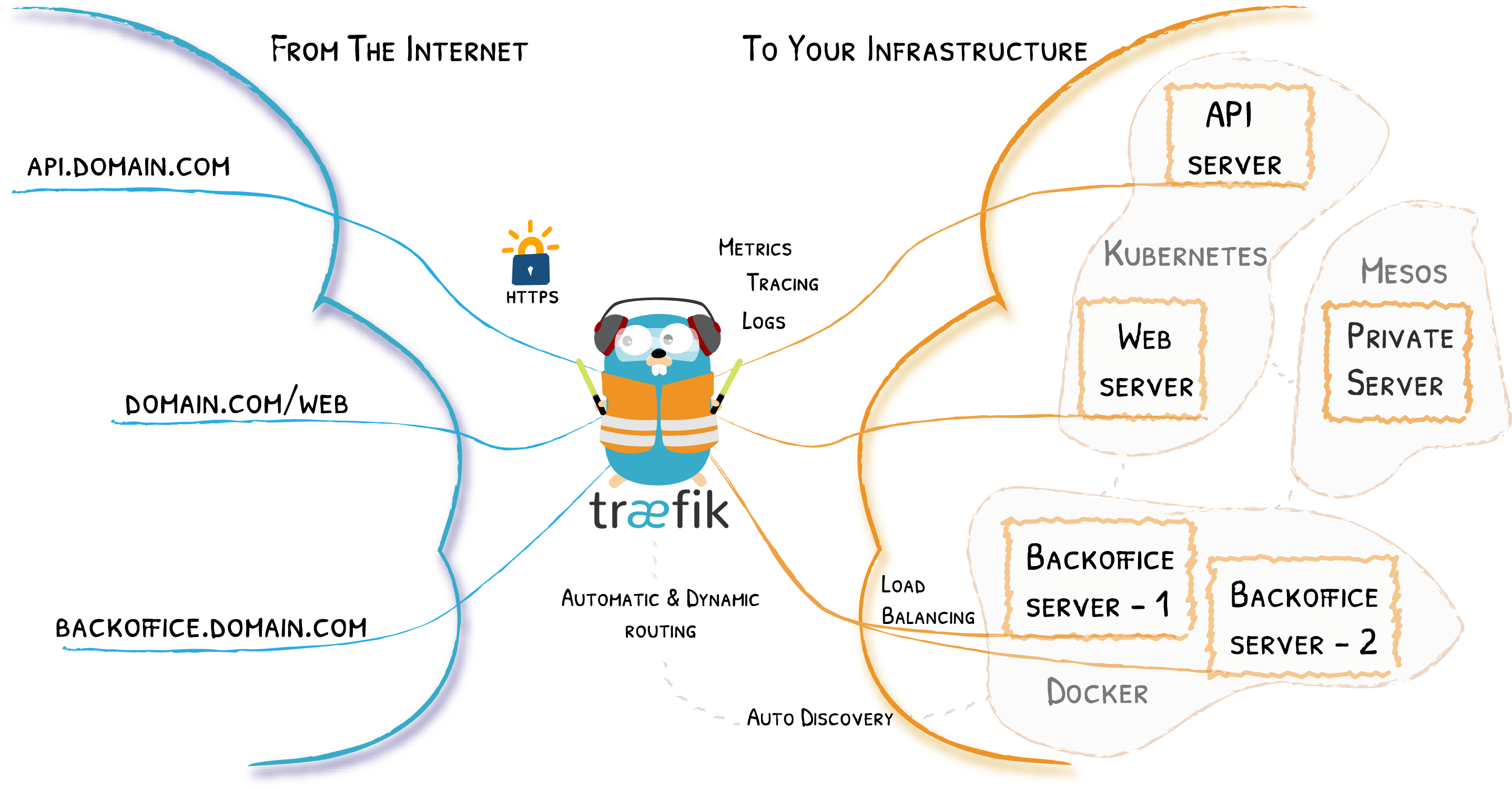
Traefik is an open-source Edge Router that makes publishing your services a fun and easy experience. It receives requests on behalf of your system and finds out which components are responsible for handling them.
What sets Traefik apart, besides its many features, is that it automatically discovers the right configuration for your services. The magic happens when Traefik inspects your infrastructure, where it finds relevant information and discovers which service serves which request.
Traefik is natively compliant with every major cluster technology, such as Kubernetes, Docker, Docker Swarm, AWS, Mesos, Marathon, and the list goes on; and can handle many at the same time. (It even works for legacy software running on bare metal.)
With Traefik, there is no need to maintain and synchronize a separate configuration file: everything happens automatically, in real time (no restarts, no connection interruptions). With Traefik, you spend time developing and deploying new features to your system, not on configuring and maintaining its working state.
Developing Traefik, our main goal is to make it simple to use, and we're sure you'll enjoy it.
The Rockchip RK3568-powered NanoPi R5S SBC with two 2.5GbE ports, one Gigabit Ethernet port, and M.2 NVMe storage is now available for $59, or $75 with a metal enclosure.
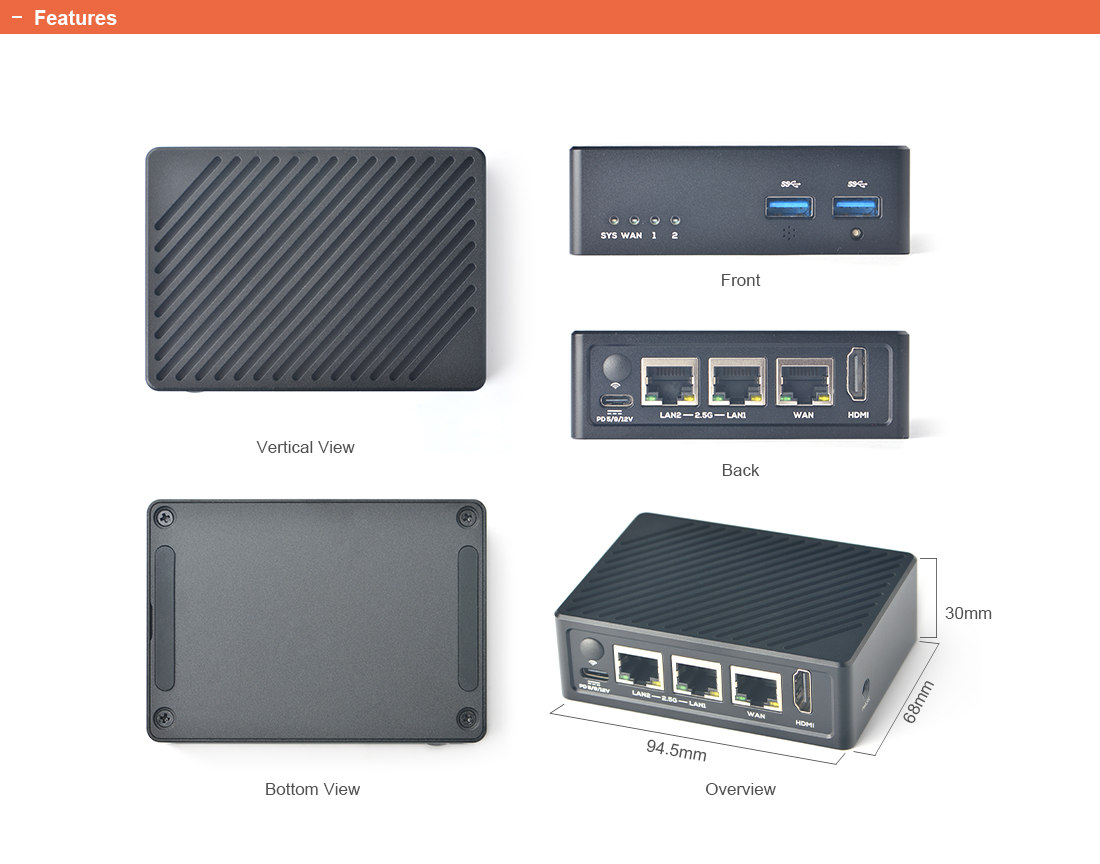
As previously mentioned, the mini router board is equipped with 2GB RAM, 8GB eMMC flash, two USB 3.0 ports, as well as an HDMI output for people wanting to make use of the Rockchip RK3568 processor’s multimedia capabilities, or simply have a user interface on a monitor.
While I was searching for a VCS capable RANCID, somewhere under a stone I found Oxidized, a 'silly attempt at rancid'. Looking at it, it seems more sophisticated, so I thought this might be the right attempt. Unfortunately there is no Debian package available, but I found an ITP created by Jonas.
RANCID monitors a router's (or more generally a device's) configuration, including software and hardware (cards, serial numbers, etc) and uses CVS (Concurrent Version System) or Subversion to maintain history of changes.
RANCID does this by the very simple process summarized as:
- login to each device in the router table (router.db),
- run various commands to get the information that will be saved,
- cook the output; re-format, remove oscillating or incrementing data,
- email any differences (sample) from the previous collection to a mail list,
- and finally commit those changes to the revision control system
At the core of our products is the fast, flexible and open source routing library GraphHopper using OpenStreetMap data. You can try it online with GraphHopper Maps a web based route planner.
GraphHopper Maps uses the Directions API for Business with world wide coverage for driving, walking and biking. Also Gnome Maps, instantnavi and others already use it - from navigation apps over logistic applications to outdoor hiking planners. See yourself how your business can benefit from a reliable, easy to use and fast routing service not standing in your way and with advanced features like the Distance Matrix API or Geocoding API.
All-in-One Wireless-N Pocket Router
The world's smallest multi-mode router, best for travelers
Create a secure wireless environment instantly across devices by simply connecting it to an Ethernet cable
Share Wi-Fi accounts at no extra cost
Acts as USB Ethernet adapter to provide Ultrabooks more stable wired connections
Supports several flexible ways to power up
Easy setup and guest management
Multi-OS compatible ,including Window 8 and Mac OS
If you are already running RouterOS, upgrading to the latest version is simple. Just one click, and RouterOS will find the latest version, show you the changelog, and offer to upgrade. You can do this from Winbox, console, Webfig or QuickSet.
MikroTik RouterBOARD 260GS
Gemanagter Layer-2 Switch
Betriebssystem MikroTik SwOS (Switch OS)
5 x Gbit Ethernet Port (10/100/1000MBit/s), RJ45
1 x SFP
Taifatech TF470 Prozessor
Stromversorgung über DC Buchse oder passives PoE (8 - 30V)
Stromverbrauch max. 6W
Betriebstemperatur -25°C bis +65°C
Komplettsystem inkl. Gehäuse und Netzteil