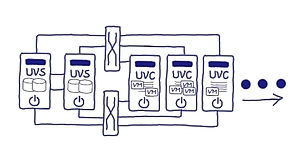
In heutigen Rechenzentren kommt eine Vielzahl von Virtualisierungskonzepten zum Einsatz. OSL führt alle drei Dimensionen der Virtualisierung – Speicher, Netzwerk und Server - in einer durchgängigen Technologie als HCI zusammen. Kern ist die von OSL entwickelte integrierte Speichervirtualisierungs- und Clusterengine, die plattformabstrakt konzipiert und umgesetzt worden ist. Sie erhalten eine wirklich einfach zu handhabende und dennoch herausragend komplette Infrastruktur für den Non-Stop-Betrieb Ihrer VM-Infrastruktur: Dynamisch, virtualisiert und auf offenen Systemen. Dank des softwarezentrierten Designs ist der Einsatz kostengünstig und zukunftssicher auf Hardware ihrer Wahl möglich.


The libvirt project:
- is a toolkit to manage virtualization platforms
- is accessible from C, Python, Perl, Go and more
- is licensed under open source licenses
- supports KVM, Hypervisor.framework, QEMU, Xen, Virtuozzo, VMWare ESX, LXC, BHyve and more
- targets Linux, FreeBSD, Windows and macOS
- is used by many applications

Provides cmdlets for automated administration of the vSphere environment.
You can configure an alarm to run a script or a command in the vSphere Web Client when the alarm is triggered.
Use the alarm environment variables to define complex scripts and attach them to multiple alarms or inventory objects. For example, you can write a script that enters the following trouble ticket information into an external system when an alarm is triggered:
- Alarm name
- Object on which the alarm was triggered
- Event that triggered the alarm
- Alarm trigger values
When you write the script, include the following environment variables in the script:
- VMWARE_ALARM_NAME
- VMWARE_ALARM_TARGET_NAME
- VMWARE_ALARM_EVENTDESCRIPTION
- VMWARE_ALARM_ALARMVALUE
You can attach the script to any alarm on any object without changing the script.
The script runs on the vCenter Server machine, and it runs even if you close the vSphere Web Client.
The VMware Explore Content Catalog Is Live
The sessions, experts, labs and experiences you love and more from the center of the multi-cloud universe.
The VMware vCenter Server APIs are organized around REST. For ease of use and security, REST builds on the standard web protocols HTTP and HTTPS, using the normal network ports 80 and 443, which are both open in most data centers, and uses standard HTTP response codes, authentication, and verbs.
Features and Compatibility
- Source image can be a clone of a VM or local vmx, ovf, ova file. This provider uses ovftool, so there should be a wide compatibility.
- Supports adding your VM to Resource Pools to partition CPU and memory usage from other VMs on your ESXi host.
- Terraform will Create, Destroy, Update & Import Resource Pools.
- Terraform will Create, Destroy, Update & Import Guest VMs.
- Terraform will Create, Destroy, Update & Import Extra Storage for Guests.
- Terraform will Create, Destroy, Update & Import vSwitches.
- Terraform will Create, Destroy, Update & Import Port Groups.
The official Terraform provider for VMware vCloud Director
- Documentation of the latest binary release available at https://www.terraform.io/docs/providers/vcd/index.html
- This project is using go-vcloud-director Golang SDK for making API calls to vCD
- Join through VMware {code} to Chat in #vcd-terraform-dev channel
The VMware Cloud Director provider is used to interact with the resources supported by VMware Cloud Director. The provider needs to be configured with the proper credentials before it can be used.
Use the navigation to the left to read about the available resources. Please refer to CHANGELOG.md to track feature additions.
About virt-manager’s supporting tools
virt-install is a command line tool which provides an easy way to provision operating systems into virtual machines.
virt-viewer is a lightweight UI interface for interacting with the graphical display of virtualized guest OS. It can display VNC or SPICE, and uses libvirt to lookup the graphical connection details.
virt-clone is a command line tool for cloning existing inactive guests. It copies the disk images, and defines a config with new name, UUID and MAC address pointing to the copied disks.
virt-xml is a command line tool for easily editing libvirt domain XML using virt-install’s command line options.
virt-convert is a command line tool for converting OVF and VMX VM configurations to run with libvirt.
virt-bootstrap is a command tool providing an easy way to setup the root file system for libvirt-based containers.
Willkommen bei der Dokumentation zu VMware Cloud Director® (früher VMware vCloud Director for Service Providers).
Sie können auf die Dokumentation im HTML-Format zugreifen, indem Sie das Inhaltsverzeichnis links auf der Seite verwenden.
Unsere gesamte Dokumentation ist auch im PDF-Format verfügbar. Sie können darauf zugreifen, indem Sie beim Lesen einer Seite oder beim Anzeigen eines Suchergebnisses auf das PDF-Downloadsymbol klicken.
Das VMware vCloud Director-Mandantenportal-Handbuch enthält Informationen zur Verwendung des VMware vCloud Director-Mandantenportals. In dieser Version verwenden Sie das Mandantenportal zum Konfigurieren von virtuellen Maschinen, vApps und Netzwerkfunktionen. Sie können auch die in dieser Version von VMware vCloud Director verfügbaren erweiterten Netzwerkfunktionen konfigurieren. Diese erweiterten Netzwerkfunktionen werden von VMware NSX® für vSphere® innerhalb einer vCloud Director-Umgebung bereitgestellt.
One of the most common questions I’m asked to cover when I discuss software architecture topics is the difference between the various application messaging protocols that exist today—issues like how and why the protocols came about, and which one should be used in a particular application.
Sie können CPU-Ressourcen hinzufügen, ändern oder konfigurieren, um die Leistung einer virtuellen Maschine zu verbessern. Sie können die meisten der CPU-Parameter beim Erstellen virtueller Maschinen oder nach der Installation des Gastbetriebssystems festlegen. Bei einigen Aktionen ist es erforderlich, die virtuelle Maschine auszuschalten, bevor Sie die Einstellungen ändern.
Building an operating system for data centers