Kubernetes ist zum Rückgrat der modernen digitalen Infrastruktur geworden – es treibt alles an, von SaaS-Plattformen bis hin zu unternehmenskritischen Systemen im Gesundheitswesen, in der Finanzbranche und in der öffentlichen Verwaltung.
Doch eine Sache wird immer noch weit unterschätzt: Kubernetes allein reicht nicht.
Der Betrieb von Kubernetes in Produktion erfordert weit mehr als das Upstream-Projekt. Du brauchst Netzwerk, Storage, Observability, Security-Hardening, Upgrade-Tooling und operative Prozesse – alles eng integriert und kontinuierlich gepflegt.
Genau hier kommen Kubernetes-Distributionen ins Spiel.
Und wenn du diese Komplexität nicht selbst betreiben möchtest, gibt es eine Abstraktionsebene höher: Managed Kubernetes oder Managed OpenShift.
In diesem Beitrag werfen wir einen Blick auf die Kubernetes-Distributionslandschaft im Jahr 2026 und erklären, warum das Auslagern des Betriebs oft die klügste Wahl ist.



Metal³ (pronounced “metal cubed”) is an open-source project that provides a set of tools for managing bare-metal infrastructure using Kubernetes.
Mission
The Metal3 Project's mission is to empower organizations with a flexible, open-source solution for bare metal provisioning that combines the benefits of bare metal performance with the ease of use and automation provided by Kubernetes.
Goals
There are a number of great open source tools for bare metal host provisioning, including Ironic. Metal³ aims to build on these technologies to provide a Kubernetes native API for managing bare metal hosts via a provisioning stack that is also running on Kubernetes. We believe that Kubernetes Native Infrastructure, or managing your infrastructure just like your applications, is a powerful next step in the evolution of infrastructure management.
The Metal³ project is also building integration with the Kubernetes cluster-api project, allowing Metal3 to be used as an infrastructure backend for Machine objects from the Cluster API.
These components integrate seamlessly to leverage the Kubernetes ecosystem and automate the provisioning and management of bare-metal infrastructure.


This repository hosts the IaC (Infrastructure as Code) configuration for my homelab.
The Homelab is backed by Proxmox VE hypervisor nodes with VMs bootstrapped using OpenTofu/Terraform.
Most of the services run on Talos flavoured Kubernetes, though I'm also running a TrueNAS VM for storage and Home Assistant VM for home automation.
To organise all the configuration, I've opted for an approach using Kustomized Helm with Argo CD which I've explained in more detail in this article.
I journal my homelab journey over at my self-hosted blog.


Talos is an immutable operating system designed to only run Kubernetes. The advantage of Talos is an out-of-the-box Kubernetes install, as well as a smaller attack surface, and easier maintenance.
In this article we’ll take a look at how to bootstrap and upgrade a multi-node Talos cluster running in VMs on a Proxmox Virtual Environment 8.2 cluster. We’ll be using OpenTofu/Terraform to do this in a declaratively following IaC principles.
This article can be treated as a continuation of my previous scribbles on Bootstrapping k3s with Cilium and running Kubernetes on Proxmox using Debian 12. The previous articles will hopefully form a basis with more nerdy details if my explanations fall short here.
The initial idea was inspired by this post written by Olav which is more straight to the point. I’ve added my own twists, tweaks and thoughts on his initial configuration which I hope warrants this article.

Talos Linux is a modern Linux distribution built for Kubernetes.
Talos Linux is Linux designed for Kubernetes – secure, immutable, and minimal.
- Supports cloud platforms, bare metal, and virtualization platforms
- All system management is done via an API. No SSH, shell or console
- Production ready: supports some of the largest Kubernetes clusters in the world
- Open source project from the team at Sidero Labs
Github: Talos releases


CloudNativePG is the Kubernetes operator that covers the full lifecycle of a highly available PostgreSQL database cluster with a primary/standby architecture, using native streaming replication.


The K10 data management platform, purpose-built for Kubernetes, provides enterprise operations teams an easy-to-use, scalable, and secure system for backup/restore, disaster recovery, and mobility of Kubernetes applications.
K10’s application-centric approach and deep integrations with relational and NoSQL databases, Kubernetes distributions, and all clouds provides teams the freedom of infrastructure choice without sacrificing operational simplicity. Policy-driven and extensible, K10 provides a native Kubernetes API and includes features such full-spectrum consistency, database integrations, automatic application discovery, multi-cloud mobility, and a powerful web-based user interface.
Given K10’s extensive ecosystem support you have the flexibility to choose environments (public/ private/ hybrid cloud/ on-prem) and Kubernetes distributions (cloud vendor managed or self managed) in support of three principal use cases:
-
Application Mobility
-

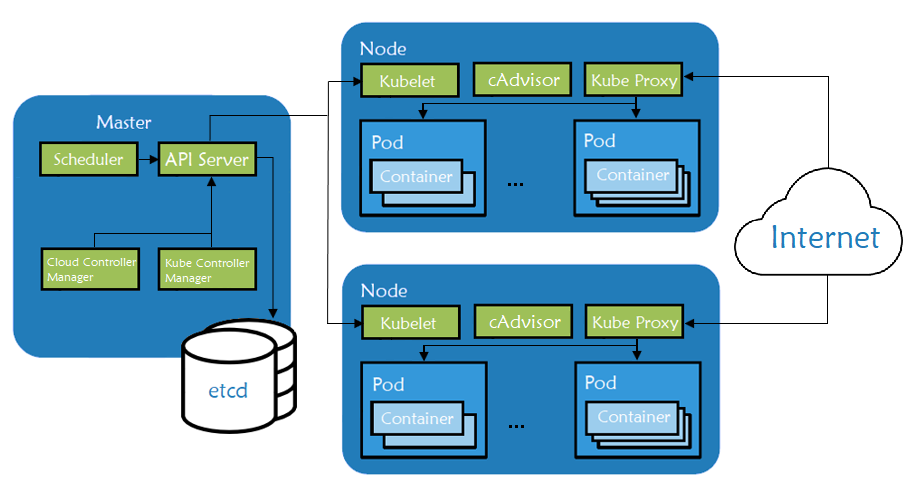
Kubernetes is an open-source orchestration engine for automating deployments, scaling, managing, and providing the infrastructure to host containerized applications. At the infrastructure level, a Kubernetes cluster is comprised of a set of physical or virtual machines, each acting in a specific role.
The master machines act as the brain of all operations and are charged with orchestrating containers that run on all of the node machines. Each node is equipped with a container runtime. The node receives instruction from the master and then takes actions to either create pods, delete them, or adjust networking rules.
Running a Kubernetes Cluster in your own data center on Bare Metal hardware can be lots of fun but also can be challenging. One of the changeless are exposing your service to an external Load Balancer, Kubernetes does not offer an implementation of an external load-balancer for bare metal cluster implementations. The Kubernetes implementations of Network Load Balancers are only available on specific Cloud Providers like AWS, GCP, Azure, etc.. and is enabled by specifying the –cloud-provider= option. leaving a gap/challenge if you create your own Bare Metal Kubernetes Cluster. While their are many workarounds to address this issue most of them are not perfect and have their own list of challenges. while I was looking for a for a solution, most recently came across a project called MetalLB, at first I was quite sceptical if its going to work, but after testing this for a while I have to say, I am quite happy with the solution.
In this post we’ll look at how ingress works in a K3s cluster. For background, I recommend reading the Networking Section of the K3s documentation.
Ingress Overview
K3s automatically deploys the Traefik Ingress Controller and provides a service load balancer called Klipper.
The Gateway API project is the successor to the Ingress API. However, it does not include the Ingress resource (the closest parallel is the HTTPRoute). As a result, a one-time conversion from your existing Ingress resources to the relevant Gateway API resources is necessary.
This guide will help you with the conversion. It will:
- Explain why you may want to switch to the Gateway API.
- Describe the key differences between the Ingress API and the Gateway API.
- Map Ingress features to Gateway API features.
- Show an example of an Ingress resource converted to Gateway API resources.
- Mention ingress2gateway for automatic conversion.
At the same time, it will not prepare you for a live migration or explain how to convert some implementation-specific features of your Ingress controller. Additionally, since the Ingress API only covers HTTP/HTTPS traffic, this guide does not cover the Gateway API support for other protocols.
The Concepts section helps you learn about the parts of the Kubernetes system and the abstractions Kubernetes uses to represent your cluster, and helps you obtain a deeper understanding of how Kubernetes works.
Welcome
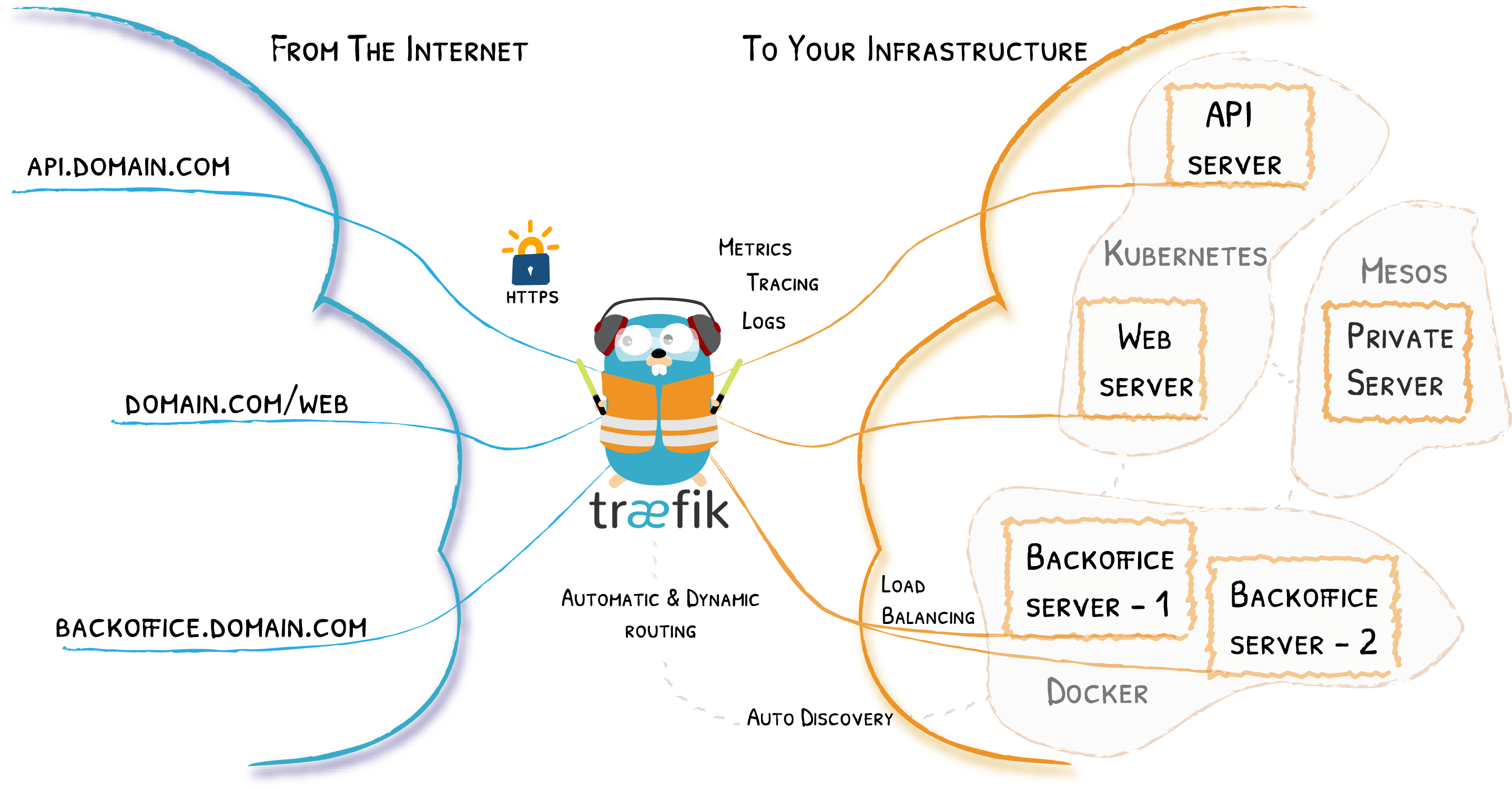
Traefik is an open-source Edge Router that makes publishing your services a fun and easy experience. It receives requests on behalf of your system and finds out which components are responsible for handling them.
What sets Traefik apart, besides its many features, is that it automatically discovers the right configuration for your services. The magic happens when Traefik inspects your infrastructure, where it finds relevant information and discovers which service serves which request.
Traefik is natively compliant with every major cluster technology, such as Kubernetes, Docker, Docker Swarm, AWS, Mesos, Marathon, and the list goes on; and can handle many at the same time. (It even works for legacy software running on bare metal.)
With Traefik, there is no need to maintain and synchronize a separate configuration file: everything happens automatically, in real time (no restarts, no connection interruptions). With Traefik, you spend time developing and deploying new features to your system, not on configuring and maintaining its working state.
Developing Traefik, our main goal is to make it simple to use, and we're sure you'll enjoy it.
Running Vault on Kubernetes is generally the same as running it anywhere else. Kubernetes, as a container orchestration engine, eases some of the operational burdens and Helm charts provide the benefit of a refined interface when it comes to deploying Vault in a variety of different modes.
In this tutorial, you will set up Vault and its dependencies with a Helm chart. You will then integrate a web application that uses the Kubernetes service account token to authenticate with Vault and retrieve a secret.


Lightweight Kubernetes. Easy to install, half the memory, all in a binary of less than 100 MB.
Great for:
- Edge
- IoT
- CI
- Development
- ARM
- Embedding K8s
- Situations where a PhD in K8s clusterology is infeasible
Strimzi provides a way to run an Apache Kafka cluster on Kubernetes in various deployment configurations.
Production ready management for File, Block and Object Storage
Docker can build images automatically by reading the instructions from a Dockerfile. A Dockerfile is a text document that contains all the commands a user could call on the command line to assemble an image. Using docker build users can create an automated build that executes several command-line instructions in succession.
This page describes the commands you can use in a Dockerfile. When you are done reading this page, refer to the Dockerfile Best Practices for a tip-oriented guide.
Find security vulnerabilities, compliance issues, and infrastructure misconfigurations early in the development cycle of your infrastructure-as-code with KICS by Checkmarx.
KICS stands for Keeping Infrastructure as Code Secure, it is open source and is a must-have for any cloud native project.