PipeWire has experimental support for the ASHA specification for hearing aids. There is a writeup with some background, and this page aims to document how this feature can be used, expected behaviour, troubleshooting, and bug reporting.


TimeLine ist ein einfach zu bedienendes Programm, um grafische Zeitleisten zu erstellen. Im Zentrum steht eine Zeitachse, auf der einmalige Ereignisse oben und Geschehnisse mit Dauer unten dargestellt werden. Durch farbige Kategorien und Gruppierung lässt sich die Übersicht verbessern.
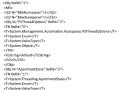
Many Powershell enthusiasts don't realize that when they are using commands like New-PsSession and streaming pipelines to a powershell runspace on a remote machine, they are actually writing a binary message wrapped in a SOAP envelope that leverages a protocol with the namesake of Windows Vista. Not much over a year ago I certainly wasn't. This set of knowledge all began with needing to transfer files from a linux machine to a windows machine. In a pure linux world there is a well known tool for this called SCP. In Windows we map drives or stream bytes to a remote powershell session. How do we get a file (or command for that matter) from one of these platforms to the other?
Ich hab mir in der Adventszeit mit meinen Kollegen Gedanken darüber gemacht, wie wir Linux-Befehle für unsere Schülerinnen und Schüler besser zugänglich machen. Die Lebenswelt unserer Lernenden fordert an dieser Stelle häufig … Videos. Das ist aber so überhaupt nicht meine Art der Unterrichtsgestaltung. Ich hab zwar schon das ein oder andere Video erstellt, aber das skaliert nicht im Alltag für dutzende Themen.
Dabei fiel mir ein, dass ich schon vor drei Jahren mit asciinema experimentiert hatte. Allerdings ist das damals für mich eingeschlafen. Nun nahm ich gestern einen neuen Anlauf und hab drei Bash-Sessions aufgenommen. Das ist relativ einfach. Allerdings vertippte ich mich häufig bei der Eingabe und musste die Befehls-Sequenzen wiederholt aufnehmen. Und mit dem Endergebnis war ich immer noch nicht zufrieden.
Das war etwas frustrierend und ich dachte mir … das kann ich doch mit einem kleinen Bash-Skript lösen. Die Umsetzung und das Ergebnis beschreibe ich im folgenden Beitrag.
 / _` / __|/ __| | | '_ \ / _ \ '_ ` _ \ / _` |
| (_| \__ \ (__| | | | | |  __/ | | | | | (_| |
 \__,_|___/\___|_|_|_| |_|\___|_| |_| |_|\__,_|
Ein Vortrag über die Entstehung, Entwicklung des Incus Projekts seit 2023 und die Möglichkeiten zur Verwaltung von System Container und virtuellen Maschinen.
Incus ist ein fork des LXD-Projektes, welches viele Jahre als Teil der Linux Container Community entwickelt und gepflegt wurde. Es bezeichnet sich selbst als modernes, sicheres und mächtiges Verwaltungswerkzeug für System Container und virtuelle Maschinen.
Der Vortrag soll einen Überblick zum genannten Projekt verschaffen und klären, wie Incus gegenüber den bekannten Projekten wie Proxmox und XCP-ng einzuordnen ist.
Im ersten Teil meines Vortrags zeige ich u. a. die Möglichkeiten auf, welche Incus bei der Verwaltung von System Container und Virtuellen Maschinen bietet. Hierbei wird auch der Unterschied erklärt zwischen Application Container, System Container und virtuellen Maschinen. Im zweiten Teil meines Vortrags gebe ich einen Überblick, wie sich Incus seit dem initialen Release im Oktober 2023 entwickelt hat und was es noch so rund um Incus gibt bzw. was für 2025 geplant ist. Zum Abschluss wird es natürlich auch eine kurze Demo geben.


Incus is a next-generation system container, application container, and virtual machine manager.
It provides a user experience similar to that of a public cloud. With it, you can easily mix and match both containers and virtual machines, sharing the same underlying storage and network.
Incus is image based and provides images for a wide number of Linux distributions. It provides flexibility and scalability for various use cases, with support for different storage backends and network types and the option to install on hardware ranging from an individual laptop or cloud instance to a full server rack.
When using Incus, you can manage your instances (containers and VMs) with a simple command line tool, directly through the REST API or by using third-party tools and integrations. Incus implements a single REST API for both local and remote access.
The Incus project was created by Aleksa Sarai as a community driven alternative to Canonical's LXD.
Today, it's led and maintained by many of the same people that once created LXD.
udev is targeted at Linux kernels 2.6 and beyond to provide a userspace solution for a dynamic /dev directory, with persistent device naming. The previous /dev implementation, devfs, is now deprecated, and udev is seen as the successor. udev vs devfs is a sensitive area of conversation - you should read this document before making comparisons.
Over the years, the things that you might use udev rules for has changed, as well as the flexibility of rules themselves. On a modern system, udev provides persistent naming for some device types out-of-the-box, eliminating the need for custom rules for those devices. However, some users will still require the extra level of customisation.
This document assumes that you have udev installed and running OK with default configurations. This is usually handled by your Linux distribution.
This document does not cover every single detail of rule writing, but does aim to introduce all of the main concepts. The finer details can be found in the udev man page.
This document uses various examples (many of which are entirely fictional) to illustrate ideas and concepts. Not all syntax is explicitly described in the accompanying text, be sure to look at the example rules to get a complete understanding.
udev (user space /dev) is a user space system that enables the operating system administrator to register user space handlers for events. The events received by udev's daemon are mainly generated by the Linux kernel in response to physical events relating to peripheral devices. As such, udev's main purpose is to act upon peripheral detection and hot-plugging, including actions that return control to the kernel, e.g. loading kernel modules or device firmware. Another component of this detection is adjusting the permissions of the device to be accessible to non-root users and groups.
As the successor of devfsd and hotplug, udev also manages device nodes in the /dev directory by adding, symlinking and renaming them. udev replaces the functionality of both hotplug and hwdetect.
udev handles separate events concurrently (in parallel), leading to a potential performance improvement over older systems.
Welcome to the OpenZFS Documentation. This resource provides documentation for users and developers working with (or contributing to) the OpenZFS project. New users or system administrators should refer to the documentation for their favorite platform to get started.


The next generation Linux workstation, designed for reliability, performance, and sustainability.






Technitium DNS Server is an open source authoritative as well as recursive DNS server that can be used for self hosting a DNS server for privacy & security. It works out-of-the-box with no or minimal configuration and provides a user friendly web console accessible using any modern web browser.
Nobody really bothers about domain name resolution since it works automatically behind the scenes and is complex to understand. Most computer software use the operating system's DNS resolver that usually query the configured ISP's DNS server using UDP protocol. This way works well for most people but, your ISP can see and control what website you can visit even when the website employ HTTPS security. Not only that, some ISPs can redirect, block or inject content into websites you visit even when you use a different DNS provider like Google DNS or Cloudflare DNS. Having Technitium DNS Server configured to use DNS-over-TLS, DNS-over-HTTPS, or DNS-over-QUIC encrypted DNS protocols with forwarders, these privacy & security issues can be mitigated very effectively.
Be it a home network or an organization's network, having a locally running DNS server gives you more insights into your network and helps to understand it better using the DNS logs and stats. It improves overall performance since most queries are served from the DNS cache making web sites load faster by not having to wait for frequent DNS resolutions. It also gives you an additional control over your network allowing you to block domain names network wide and also allows you to route your DNS traffic securely using encrypted DNS protocols.

This project is now known as “libostree”, though it is still appropriate to use the previous name: “OSTree” (or “ostree”). The focus is on projects which use libostree’s shared library, rather than users directly invoking the command line tools (except for build systems). However, in most of the rest of the documentation, we will use the term “OSTree”, since it’s slightly shorter, and changing all documentation at once is impractical. We expect to transition to the new name over time.
As implied above, libostree is both a shared library and suite of command line tools that combines a “git-like” model for committing and downloading bootable filesystem trees, along with a layer for deploying them and managing the bootloader configuration.
The core OSTree model is like git in that it checksums individual files and has a content-addressed-object store. It’s unlike git in that it “checks out” the files via hardlinks, and they thus need to be immutable to prevent corruption. Therefore, another way to think of OSTree is that it’s just a more polished version of Linux VServer hardlinks.
Features:
- Transactional upgrades and rollback for the system
- Replicating content incrementally over HTTP via GPG signatures and “pinned TLS” support
- Support for parallel installing more than just 2 bootable roots
- Binary history on the server side (and client)
- Introspectable shared library API for build and deployment systems
- Flexible support for multiple branches and repositories, supporting projects like Flatpak which use libostree for applications, rather than hosts.

An innovative platform for hardware, clouds, and containers, built with love by you.

Imagine a system with one or more LUKS encrypted partitions (root or others) or volumes and you need to unlock these partitions/volumes during startup. In this case you need to be able to log in remotely and provide a password at the early boot phase. This can be achieved by using one or more mkinitcpio hook(s) that configure a network interface and start some kind of SSH server. Some packages listed below contribute various mkinitcpio build hooks to ease the configuration. The following tutorials add a remote unlocking method in addition to the existing local console password prompt.
In diesem Artikel gebe ich euch einen Überblick, was Network Bound Disk Encryption (NBDE) ist und beschreibe einen konkreten Anwendungsfall. Am Ende des Artikels führe ich einige Verweise auf, mit deren Hilfe ihr NBDE bei Interesse selbst implementieren könnt.
Rocky Linux is an open-source enterprise operating system designed to be 100% bug-for-bug compatible with Red Hat Enterprise Linux®. Rocky Linux is under intensive development by the community.


bpftrace is a high-level tracing language for Linux. bpftrace uses LLVM as a backend to compile scripts to eBPF-bytecode and makes use of libbpf and bcc for interacting with the Linux BPF subsystem, as well as existing Linux tracing capabilities: kernel dynamic tracing (kprobes), user-level dynamic tracing (uprobes), tracepoints, etc. The bpftrace language is inspired by awk, C, and predecessor tracers such as DTrace and SystemTap. bpftrace was created by Alastair Robertson.
Manage, store, and distribute sensitive data with OpenBao
OpenBao is an open source, community-driven fork of Vault managed by the Linux Foundation.


Talos Linux is a modern Linux distribution built for Kubernetes.
Talos Linux is Linux designed for Kubernetes – secure, immutable, and minimal.
- Supports cloud platforms, bare metal, and virtualization platforms
- All system management is done via an API. No SSH, shell or console
- Production ready: supports some of the largest Kubernetes clusters in the world
- Open source project from the team at Sidero Labs

