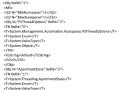
Many Powershell enthusiasts don't realize that when they are using commands like New-PsSession and streaming pipelines to a powershell runspace on a remote machine, they are actually writing a binary message wrapped in a SOAP envelope that leverages a protocol with the namesake of Windows Vista. Not much over a year ago I certainly wasn't. This set of knowledge all began with needing to transfer files from a linux machine to a windows machine. In a pure linux world there is a well known tool for this called SCP. In Windows we map drives or stream bytes to a remote powershell session. How do we get a file (or command for that matter) from one of these platforms to the other?

🐝 Why Flyoobe?
Originally, Flyby11 was a simple patcher to remove the restrictions stopping you from installing Windows 11 (24H2) on unsupported hardware.
Old PC? No TPM, no Secure Boot, unsupported CPU? Flyby11 let you install Windows 11 anyway.
After helping thousands upgrade, one thing became clear:
Bypassing checks is only half the battle.
We needed a full setup solution — one that respects user choices instead of Microsoft's defaults.
Flyoobe was the next step:
- Skip the fluff
- Remove the junk
- Take full control from first boot
Because your PC should work for you, not the other way around.
Flyoobe keeps the original idea alive and pushes it even further.
- Delprof2
- SetACL Studio
- SetACL
- SendToSplunk
- DiskLED
- FileIOTest
- SessionProtocolInfo
- ...
Technitium DNS Server is an open source authoritative as well as recursive DNS server that can be used for self hosting a DNS server for privacy & security. It works out-of-the-box with no or minimal configuration and provides a user friendly web console accessible using any modern web browser.
Nobody really bothers about domain name resolution since it works automatically behind the scenes and is complex to understand. Most computer software use the operating system's DNS resolver that usually query the configured ISP's DNS server using UDP protocol. This way works well for most people but, your ISP can see and control what website you can visit even when the website employ HTTPS security. Not only that, some ISPs can redirect, block or inject content into websites you visit even when you use a different DNS provider like Google DNS or Cloudflare DNS. Having Technitium DNS Server configured to use DNS-over-TLS, DNS-over-HTTPS, or DNS-over-QUIC encrypted DNS protocols with forwarders, these privacy & security issues can be mitigated very effectively.
Be it a home network or an organization's network, having a locally running DNS server gives you more insights into your network and helps to understand it better using the DNS logs and stats. It improves overall performance since most queries are served from the DNS cache making web sites load faster by not having to wait for frequent DNS resolutions. It also gives you an additional control over your network allowing you to block domain names network wide and also allows you to route your DNS traffic securely using encrypted DNS protocols.

The SQLite Database Engine provides a lightweight C library to access database files using a large subset of SQL92 without the overhead of RDBMS server processes. In order to use that functionality as a desktop database I wrapped the SQLite library into an ODBC driver.
So far it has been tested with SQLite 2.8.17 and SQLite 3.43.2 on Windows (>= NT/2000) in MS Excel 97 (MSQUERY) with SQLite database files created on Linux. Support for Win64 exists for both SQLite 2.x and SQLite 3.x versions of the driver. It also runs on Linux with unixODBC 2.[0-2].x and with libiodbc 3.[05].x.


This is a ACMEv2 client for Windows that aims to be very simple to start with, but powerful enough to grow into almost every scenario.
- A very simple interface to create and install certificates on a local IIS server
- A more advanced interface for many other use cases, including Apache and Exchange
- Automatically creates a scheduled task to renew certificates when needed
- Get certificates with wildcards (*.example.com), international names (证书.example.com), OCSP Must Staple extension (optional).
- Re-use private keys for DANE, use EC crypto or bring your own CSR
- Advanced toolkit for DNS, HTTP and TLS validation: SFTP/FTPS, acme-dns, Azure, Route53, Cloudflare and many more…
- Store your certificates where and how you want them: Windows, IIS Central Store, .pem files, .pfx file or KeyVault
- Compatible with all popular ACME services, including Let’s Encrypt, ZeroSSL, DigiCert, Sectigo, Buypass, Keyon and others…
- Completely unattended operation from the command line
- Other forms of automation through manipulation of .json files
- Write your own Powershell .ps1 scripts to handle installation and validation
- Build your own plugins with C#
PuTTY is a free (MIT-licensed) Windows Telnet and SSH client. This manual documents PuTTY, and its companion utilities PSCP, PSFTP, Plink, Pageant and PuTTYgen.
Note to Unix users: this manual currently primarily documents the Windows versions of the PuTTY utilities. Some options are therefore mentioned that are absent from the Unix version; the Unix version has features not described here; and the pterm and command-line puttygen and pageant utilities are not described at all. The only Unix-specific documentation that currently exists is the man pages.
This manual is copyright 1997-2022 Simon Tatham. All rights reserved. You may distribute this documentation under the MIT licence. See appendix D for the licence text in full.

Provides cmdlets for automated administration of the vSphere environment.
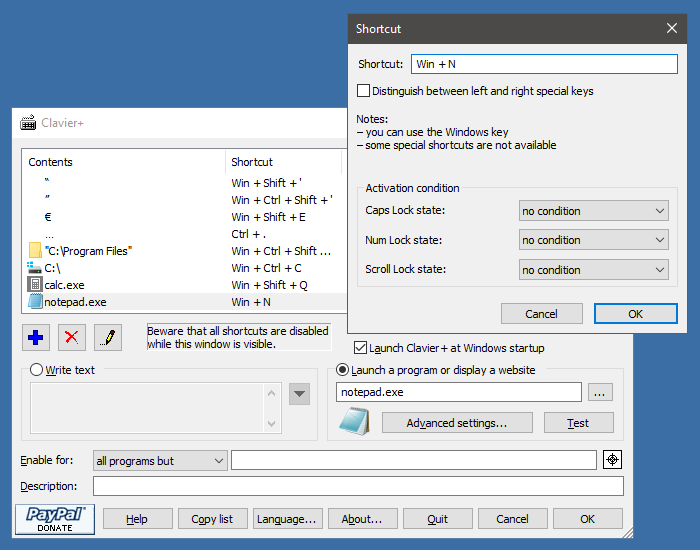
Clavier+ is a Windows utility that allows to create keyboard shortcuts involving almost any key, including the Windows keys, to launch programs, write text, open websites, ...
You always launch the same programs, navigate to the same websites? Create a simple shortcut to do it quicker.
Tired of writing your E-mail address? Create a universal keyboard shortcut to write it: it will work under Word, Excel, and your favorite Internet browser!
Clavier+ allows to associate actions to keyboard shortcuts.
Features:
-
Global shortcuts, available in almost any software.
-
Lauching a program or writing text with a single keystroke.
-
Small, portable, and fast: just an EXE of less than 200 Kb, no data in the Registry, setup program not required.
unAsService is a command line tool that allows you to setup a regular console application to run as a service.
This tool requires that .NET Framework 4.5 be already installed on your computer. If you do not have .NET Framework 4.5 this tool will display a message and not run.
IMPORTANT: Any services you install using this tool will require that this tool remain on that computer in the same location in order for those services to continue functioning. Therefore before installing any services you should make sure this tool is somewhere where it can remain permanently. If you do end up moving this tool use the 'fixservices' action to fix the existing services. (details on how to use 'fixservices' can be found below)
RunAsService Typing just the name of the tool without specifying any parameters. Or specifying incorrect paramters will bring you to this help screen you are currently reading.
RunAsService install [Name] [Display Name] PathToExecutable [Args] Name The name of the service, if none is specified the name will default to the name of the executable.
nssm is a service helper which doesn't suck. srvany and other service helper programs suck because they don't handle failure of the application running as a service. If you use such a program you may see a service listed as started when in fact the application has died. nssm monitors the running service and will restart it if it dies. With nssm you know that if a service says it's running, it really is. Alternatively, if your application is well-behaved you can configure nssm to absolve all responsibility for restarting it and let Windows take care of recovery actions.
nssm logs its progress to the system Event Log so you can get some idea of why an application isn't behaving as it should.
nssm also features a graphical service installation and removal facility. Prior to version 2.19 it did suck. Now it's quite a bit better.

Visual Studio Code is a lightweight but powerful source code editor which runs on your desktop and is available for Windows, macOS and Linux. It comes with built-in support for JavaScript, TypeScript and Node.js and has a rich ecosystem of extensions for other languages (such as C++, C#, Java, Python, PHP, Go) and runtimes (such as .NET and Unity). Begin your journey with VS Code with these introductory videos.
Git for Windows focuses on offering a lightweight, native set of tools that bring the full feature set of the Git SCM to Windows while providing appropriate user interfaces for experienced Git users and novices alike.
NOTE: This solution should only be used in non-production environments as a method to get familiar with Ansible. For production use, I recommend installing Ansible on a dedicated Linux server.
An automated deployment tool is a must have for any IT environment. In my lab, that’s Ansible. I’ve used Ansible in my lab to automate VM deployment/destruction, adding SSH keys for remote access to my servers, joining/leaving AD domain, and monitoring the newly deployed VMs. This is very useful as I frequently deploy/destroy VMs for testing a specific use case.
For a Windows admin, Ansible can seem daunting… For one, it runs on linux. Second, it’s based off of Python. I’m here to tell you, it’s not that difficult. In fact, did you know that Ansible is one of the few configuration management tools out there that can easily/natively use PowerShell code?
In this post, I’m going to review the steps involved in getting Ansible installed & running on Windows Server 2019. While install times may vary due to lab resources and internet speed, I’m able to complete the steps outlined below for installing Ansible in a little over 20 minutes.
Parameter Extensions
- %~f1 Expand %1 to a Fully qualified path name - C:\utils\MyFile.txt
- %~d1 Expand %1 to a Drive letter only - C:
- %~p1 Expand %1 to a Path only e.g. \utils\ this includes a trailing \ which will be interpreted as an escape character by some commands.
- %~n1 Expand %1 to a file Name without file extension or path - MyFile or if only a path is present, with no trailing backslash, the last folder in that path.
- %~x1 Expand %1 to a file eXtension only - .txt
- %~s1 Change the meaning of f, n, s and x to reference the Short 8.3 name (if it exists.)
- %~1 Expand %1 removing any surrounding quotes (")
- %~a1 Display the file attributes of %1
- %~t1 Display the date/time of %1
- %~z1 Display the file size of %1
- %~$PATH:1 Search the PATH environment variable and expand %1 to the fully qualified name of the first match found.
Remotely was created by Translucency Software with the goal of making IT support tools that adhere to the following ideals:
- IT shops should be able to decide if they want to host their own servers.
- A remote console can be used to solve many problems without ever needing to inconvenience the user with full desktop control.
- Remote support tools should allow technicians to accomplish tasks without an excessive amount of clicking and waiting for pages to load.
Eliminate the barrier between your machines.
What is it?
Barrier is software that mimics the functionality of a KVM switch, which historically would allow you to use a single keyboard and mouse to control multiple computers by physically turning a dial on the box to switch the machine you're controlling at any given moment. Barrier does this in software, allowing you to tell it which machine to control by moving your mouse to the edge of the screen, or by using a keypress to switch focus to a different system.
Barrier was forked from Symless's Synergy 1.9 codebase. Synergy was a commercialized reimplementation of the original CosmoSynergy written by Chris Schoeneman.
At the moment, barrier is not compatible with synergy. Barrier needs to be installed on all machines that will share keyboard and mouse.
What's different?
Whereas Synergy has moved beyond its goals from the 1.x era, Barrier aims to maintain that simplicity. Barrier will let you use your keyboard and mouse from one computer to control one or more other computers. Clipboard sharing is supported. That's it.