
Zum Import und Export gibt es zusätzlich beispielsweise Pandoc.
Aus MS Word ist der Asciidoc-Export vergleichsweise einfach
pandoc another.docx -f docx -t asciidoc --wrap=none --markdown-headings=atx --extract-media=images -o another.en.adocUm von Asciidoc nach Word zu exportieren legt man einen Docbook-Export als Zwischenschritt ein:
asciidoctor --backend docbook pdf.en.adoc --out-file pdf.en.docbook
pandoc --from docbook --to docx --output pdf.en.docx  --highlight-style espresso .\pdf.en.docbook
Wie PDF-Themes kann man sich auch Word-Vorlagedateien konfigurieren, dann sähe ein Export in etwa so aus:
pandoc -o my-custom-styles.docx \
--print-default-data-file reference.docx
Welcome to the VPN server documentation page. This site is intended for VPN server operators. It contains information on how to deploy the VPN software on a server, but also (technical) details on how to (better) integrate the software in existing infrastructure, and how configure the software for one’s own organization.
This is an (incomplete) list of features of the VPN software:
- OpenVPN server accepting connections on both UDP and TCP ports;
- Uses multiple OpenVPN processes for load sharing purposes;
- High Available deployments with multiple portals and nodes;
- Scales from a Raspberry Pi to many core systems with 10GBit networking;
- Full IPv6 support, using IPv6 inside the tunnel and connecting over IPv6;
- Support both NAT and Public IPs;
- Embedded CA for managing OpenVPN client certificates;
- Full support for WireGuard;
- Secure server and client configuration out of the box;
- User Portal to allow users to manage their VPN configurations on their devices and Admin Portal to manage users and connections;
- Internationalization / Localization support;
- Authentication to portals using Local User DB (default), LDAP, RADIUS, OIDC, SAML and Client Certificates;
- OAuth 2.0 API for integration with native eduVPN/Let’s Connect! applications;
- Deployment scenarios:
- Full Tunnel to route all traffic over the VPN (for safer Internet usage on untrusted networks);
- Split Tunnel to route only some traffic over the VPN (for access to the organization network);
- Client-to-client (only) networking;
- Group Permissions support with SAML, LDAP authentication backends as well as “Static”;
- Ability to configure Logging;
- Support multiple deployment scenarios simultaneously;
- SELinux fully enabled (on Fedora, EL);
- Usage Statistics and Monitoring;
- Some Preview Features;


Proxy UDP connections over HTTP(s). The main use case is to proxy WireGuard packets.

bpftrace is a high-level tracing language for Linux. bpftrace uses LLVM as a backend to compile scripts to eBPF-bytecode and makes use of libbpf and bcc for interacting with the Linux BPF subsystem, as well as existing Linux tracing capabilities: kernel dynamic tracing (kprobes), user-level dynamic tracing (uprobes), tracepoints, etc. The bpftrace language is inspired by awk, C, and predecessor tracers such as DTrace and SystemTap. bpftrace was created by Alastair Robertson.

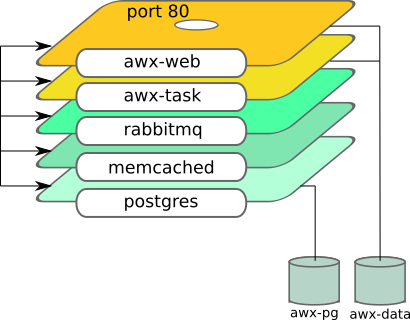
This Ansible role sets up Ansible AWX server using containers. It uses podman to do it.
See this blog how to use it: Automate Podman Containers with Ansible 2/2
Role dependency



Nix is a purely functional package manager. This means that it treats packages like values in purely functional programming languages such as Haskell — they are built by functions that don’t have side-effects, and they never change after they have been built. Nix stores packages in the Nix store, usually the directory /nix/store, where each package has its own unique subdirectory such as
/nix/store/b6gvzjyb2pg0kjfwrjmg1vfhh54ad73z-firefox-33.1/
where b6gvzjyb2pg0… is a unique identifier for the package that captures all its dependencies (it’s a cryptographic hash of the package’s build dependency graph). This enables many powerful features.


The official Nextcloud installation method. Nextcloud AIO provides easy deployment and maintenance with most features included in this one Nextcloud instance.
Included are:
- Nextcloud
- High performance backend for Nextcloud Files
- Nextcloud Office (optional)
- High performance backend for Nextcloud Talk and TURN-server (optional)
- Nextcloud Talk Recording-server (optional)
- Backup solution (optional, based on BorgBackup)
- Imaginary (optional, for previews of heic, heif, illustrator, pdf, svg, tiff and webp)
- ClamAV (optional, Antivirus backend for Nextcloud)
- Fulltextsearch (optional)
- Whiteboard (optional)
- Docker Socket Proxy (optional, needed for Nextcloud App API)
- Community containers

Let’s talk about Docker and Nix today. Before explaining what Nix is, if you don’t know yet, and before going into the details, I will show you a snippet similar to a Dockerfile for creating a Redis image equivalent to the one in docker hub.
The final image will be around 42mb (or 25mb) in size, compared to 177mb.
EDIT: as mentioned on HN, alpine-based images can even go around 15mb in size.
If you want to try this, the first step is to install Nix.
Podman can run rootless containers and be a drop-in replacement for Docker.
Build Your Own Darknet
Discover the simplest way to re-enter independent computing with our framework. Placing control directly at your fingertips.

Self-hosting services empowers you with greater control and flexibility over your data. However, maintaining such systems today often comes with significant technical challenges, including firewall/NAT configuration, data loss prevention, and security management.
The Clan project aims to lower the technical barriers of self-hosting with NixOS, making it accessible even to non-technical users. Our goal is to simplify the installation and maintenance of NixOS machines.
In this talk, we will present the new NixOS extensions we've developed to scale self-hosting, including VPN integration, backup management, secret management, a unified CLI for installation and updates, and an inventory system for managing clusters of machines.
We will also provide a sneak preview of the upcoming graphical user interface.
NixCon is a community-oriented conference for contributors and users of Nix and NixOS. It's about sharing experiences, inspiring people and discussing future development. We would like to learn about how you use Nix and NixOS in your organization and what you are currently working on. The growth of NixOS as a project brings its own challenges and we would like to know how you think the user experience can be improved and how NixOS can be scaled.
- NixCon - the community conference about Nix & NixOS
- Github: NixCon - the community conference about Nix & NixOS

microvm.nix is a Flake to run lightweight NixOS virtual machines on NixOS. Starting with the reasons why for the remainder of this chapter, this handbook guides you through the provisioning of MicroVMs on your NixOS machine.
Compartmentalization
NixOS makes running services a breeze. Being able to quickly rollback configuration is a life-saver. Not so much however on systems that are shared by multiple services where maintenance of one affects others.
Increase stability by partitioning services into virtual NixOS systems that can be updated individually.
microvm.nix can isolate your /nix/store into exactly what is required for the guest's NixOS: the root filesystem is a read-only erofs/squashfs file-systems that include only the binaries of your configuration. Of course, that holds only true until you mount the host's /nix/store as a share for faster build times, or mount the store with a writable overlay for Nix builds inside the VM.
The Case Against Containers
Linux containers are not a single technology but a plethora of kernel features that serve to isolate various system resources so that the running system appears as one. It is still one shared Linux kernel with a huge attack surface.
Virtual machines on the other hand run their own OS kernel, reducing the attack surface to the hypervisor and its device drivers. The resource usage however incurs some overhead when compared with containers, with memory allocation being especially inflexible.
microvm.nix is a tool that helps you building the guest's OS and running it in ways that are easier than writing a Dockerfile, once you know how to put a NixOS config into a flake.nix file.
Just Virtual Machines?
Full virtualization has been available for a long time with QEMU and VirtualBox. The MicroVM machine type highlights that virtualization overhead has been reduced a lot by replacing emulated devices with virtio interfaces that have been optimized for this environment.
This Flake offers you to run your MicroVMs not only on QEMU but with other Hypervisors that have been explicitly authored for virtio. Some of them are written in Rust, a programming language that is renowned for being safer than C.

NixVim - A Neovim configuration system for nix





A KISS deployment tool to keep your NixOS fleet (servers & workstations) up to date.
This name was chosen because Bento are good, and comes with the idea of "ready to use". And it doesn't use "nix" in its name.
Use with flakes: nix shell github:rapenne-s/bento

Nix is a powerful package manager for Linux and other Unix systems that makes package management reliable and reproducible.
- Resources
- Learning
- Discovery
- Installation Media
- Channel History
- Deployment Tools
- Virtualisation
- Command-Line Tools
- Development
- DevOps
- Programming Languages
- Arduino
- Clojure
- Crystal
- Elm
- Gleam
- Haskell
- Haxe
- Lean
- Node.js
- OCaml
- PHP
- PureScript
- Python
- Ruby
- Rust
- Scala
- Zig
- NixOS Modules
- NixOS Configuration Editors
- Overlays
- Distributions
- Community