Casbin is a powerful and efficient open-source access control library that supports various access control models for enforcing authorization across the board.
Enforcing a set of rules is as simple as listing subjects, objects, and the desired allowed action (or any other format as per your needs) in a policy file. This is synonymous across all flows in which Casbin is used. The developer/administrator has complete control over the layout, execution, and conditions for authorization, which are set via the model file. Casbin provides an Enforcer for validating an incoming request based on the policy and model files given to the Enforcer.


Authorization plays a vital role in building secure and robust applications, ensuring that users possess the necessary permissions to access resources or perform particular actions.
In Python, developers often follow authorization anti-patterns that can potentially lead to security vulnerabilities, needless code complexity, and significant maintenance difficulties. This article examines various best practices to avoid these anti-patterns and provides strategies to implement more effective authorization in your Python applications.

Vanilla OS is not your regular Linux distribution, we define it as a Linux based operating system due to the new paradigms it introduces and the different standards it follows. This page explains what Vanilla OS is and how it is different from other Linux distributions.

The unittest unit testing framework was originally inspired by JUnit and has a similar flavor as major unit testing frameworks in other languages. It supports test automation, sharing of setup and shutdown code for tests, aggregation of tests into collections, and independence of the tests from the reporting framework.
To achieve this, unittest supports some important concepts in an object-oriented way:
- test fixture
A test fixture represents the preparation needed to perform one or more tests, and any associated cleanup actions. This may involve, for example, creating temporary or proxy databases, directories, or starting a server process. - test case
A test case is the individual unit of testing. It checks for a specific response to a particular set of inputs. unittest provides a base class, TestCase, which may be used to create new test cases. - test suite
A test suite is a collection of test cases, test suites, or both. It is used to aggregate tests that should be executed together. - test runner
A test runner is a component which orchestrates the execution of tests and provides the outcome to the user. The runner may use a graphical interface, a textual interface, or return a special value to indicate the results of executing the tests.
Reference:
- python3 doc: unittest.mock — getting started
- python3 doc: unittest.mock — mock object library
- python3 doc: unittest — Unit testing framework - assert methods
- python3 doc: unittest — Unit testing framework - class unittest.TestCase(methodName='runTest')

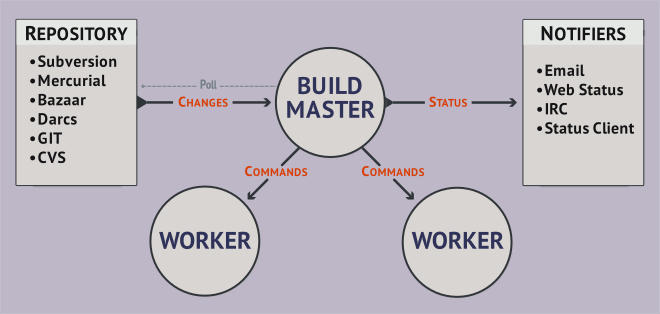
At its core, Buildbot is a job scheduling system: it queues jobs, executes the jobs when the required resources are available, and reports the results.
Your Buildbot installation has one or more masters and a collection of workers. The masters monitor source-code repositories for changes, coordinate the activities of the workers, and report results to users and developers. Workers run on a variety of operating systems.
You configure Buildbot by providing a Python configuration script to the master. This script can be very simple, configuring built-in components, but the full expressive power of Python is available. This allows dynamic generation of configuration, customized components, and anything else you can devise.
The framework itself is implemented in Twisted Python, and compatible with all major operating systems.

Testing applications has become a standard skill set required for any competent developer today. The Python community embraces testing, and even the Python standard library has good inbuilt tools to support testing. In the larger Python ecosystem, there are a lot of testing tools. Pytest stands out among them due to its ease of use and its ability to handle increasingly complex testing needs.



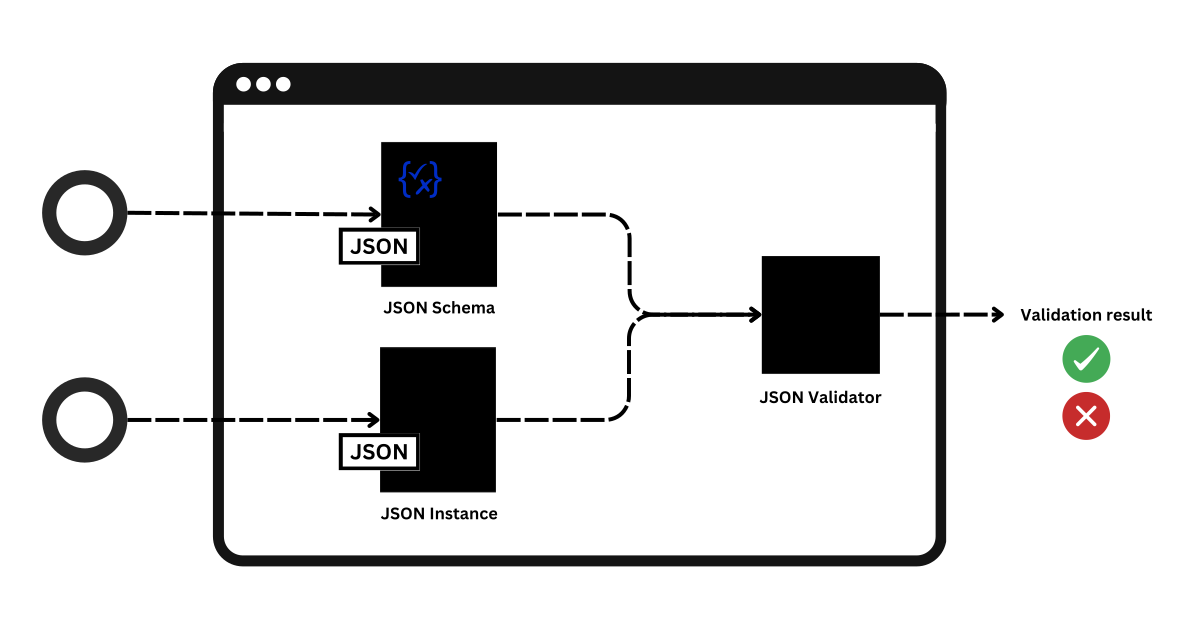
When it comes to data exchange, JSON Schema stands out as a powerful standard for defining the structure and rules of JSON data. It uses a set of keywords to define the properties of your data.
While JSON Schema provides the language, validating a JSON instance against a schema requires a JSON Schema validator. The JSON validator checks if the JSON documents conform to the schema.
JSON Schema Validators are tools that implement the JSON Schema specification. Such tooling enables easy integration of JSON Schema into projects of any size.

This package provides tooling for validating and building Ansible documentation. It mainly consists of a CLI tool, antsibull-docs, and a Sphinx extension. The main output format are reStructured Text (RST) files for consumption by Sphinx.
- Ansible documentation style guide
- antsibull-docs – Ansible Documentation Build Scripts: Creating a collection docsite

Expand your automation to a virtually unlimited set of use cases.

This repo contains branding assets for the AWX project. You may use these assets provided you agree to, and strictly adhere to, our trademark guidelines.
For instructions on how to incorporate these assets into the AWX build process, please view the installation guide.
Introduction
Ansible Development Tools or ADT for short, aims to streamline the setup and usage of several tools needed to create Ansible content. When it comes to creating automation content using Ansible, there are several packages available that can help users in different parts of the content-creating journey. From bootstrapping new projects, all the way to ensuring content follows best practices and verifying it behaves as intended via well-established test frameworks.
Key Features
-
All-in-One Ansible Toolkit: ansible-dev-tools combines critical Ansible development packages into a unified Python package called ansible-dev-tools.
-
Simplified Ansible Automation: ansible-dev-tools focuses on crafting your automation scenarios and workflows with speed by reducing boilerplate code without dealing with the intricacies of managing and integrating different Ansible libraries.
For those looking for an IDE-based experience, we also recommend you get familiar with the Ansible extension for VSCode.
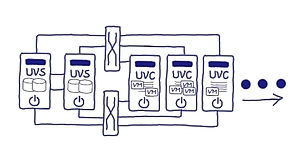
In heutigen Rechenzentren kommt eine Vielzahl von Virtualisierungskonzepten zum Einsatz. OSL führt alle drei Dimensionen der Virtualisierung – Speicher, Netzwerk und Server - in einer durchgängigen Technologie als HCI zusammen. Kern ist die von OSL entwickelte integrierte Speichervirtualisierungs- und Clusterengine, die plattformabstrakt konzipiert und umgesetzt worden ist. Sie erhalten eine wirklich einfach zu handhabende und dennoch herausragend komplette Infrastruktur für den Non-Stop-Betrieb Ihrer VM-Infrastruktur: Dynamisch, virtualisiert und auf offenen Systemen. Dank des softwarezentrierten Designs ist der Einsatz kostengünstig und zukunftssicher auf Hardware ihrer Wahl möglich.

FD.io's Vector Packet Processor (VPP) is a fast, scalable layer 2-4 multi-platform network stack. It runs in Linux Userspace on multiple architectures including x86, ARM, and Power architectures.
VPP's high performance network stack is quickly becoming the network stack of choice for applications around the world.
VPP is continually being enhanced through the extensive use of plugins. The Data Plane Development Kit (DPDK) is a great example of this. It provides some important features and drivers for VPP.
VPP supports integration with OpenStack and Kubernetes. Network management features include configuration, counters, sampling and more. For developers, VPP includes high-performance event-logging, and multiple kinds of packet tracing. Development debug images include complete symbol tables, and extensive consistency checking.
Some VPP Use-cases include vSwitches, vRouters, Gateways, Firewalls and Load-Balancers, to name a few.


In this talk, Pim will demonstrate high performance routing using open-source VPP and its underlying Data Plane Development Kit. This talk highlights the authors work on integrating the Linux Control Plane which makes BGP, OSPF, etc available with VPP. We’ll then turn to a popular DPDK based network load testing tool TRex, and discuss performance benchmarking results from the field using the author’s AS8298 as a practical example.
About the speakers
Pim van Pelt is known for SixXS, a global IPv6 tunnelbroker which ran from 2001-2017. In this journey, he found that IPv4/IPv6 routing at scale (many interfaces, many prefixes or many packets/sec) was better handled in user space rather than the kernel (both for FreeBSD and Linux). Today, Pim operates IPng Networks, a small ISP in Switzerland, using AMD64 based routers running VPP, which will give silicon-based routers a run for their money.
vNOG blog: https://virtualnog.net/posts/2022-06-24-vpp/

In this talk, Pim will demonstrate high performance routing using open-source VPP and its underlying Data Plane Development Kit. This talk highlights the authors work on integrating the Linux Control Plane which makes BGP, OSPF, etc available with VPP, including smart ways to automate configuration of the router's data- and controlplane layers.
We’ll then turn to a popular DPDK based network load testing tool TRex, and discuss performance benchmarking results from the field using the author’s AS8298 as a practical example. This will demonstrate that a fully open source router can seriously compete with silicon based router vendors.

Website for Forgejo
This website is built with Astro and Tailwind CSS, and is based on the AstroWind template.
When a branch foobar is pushed to the repository, the content is rendered for preview at https://forgejo.codeberg.page/@foobar/.
When a PR is created, its content is rendered for preview at https://forgejo.codeberg.page/@pull_1234/ where 1234 is the number of the PR.
The forgejo-website user is dedicated to providing an application token set to websitetoken and allows for publishing the branch and CI previews in https://codeberg.org/forgejo/pages.




Niolesk
Edit diagrams from textual descriptions! : A kroki interface.
- Application : https://niolesk.top/
- Project page : https://github.com/webgiss/niolesk/
- Container image : ghcr.io/webgiss/niolesk (static site served by nginx)
Description
Provide an interface for https://kroki.io/
Just add any kroki url after the url of niolesk followed by # and you'll be able to edit the diagram, and export again a new url after change.


An extension for Asciidoctor.js to convert diagrams to images using Kroki!
