This article describes how you can customize Thunderbird's date and time formats using regional settings or override preferences.
≡ > Preferences > General > "Config Editor":.
- intl.date_time.pattern_override.date_short = yyyy-MM-dd
- intl.date_time.pattern_override.time_short = HH:mm
- intl.date_time.pattern_override.connector_short = {1}'T'{0}



CloudNativePG is the Kubernetes operator that covers the full lifecycle of a highly available PostgreSQL database cluster with a primary/standby architecture, using native streaming replication.


Multiple rules may be added based on the requirements. Adding a new rule should combine implementation, testing and documentation.

- Podman (Pod Manager) Global Options, Environment Variables, Exit Codes, Configuration Files, and more
- attach Attach to a running container
- auto-update Auto update containers according to their auto-update policy
- build Build an image using instructions from Containerfiles
- commit Create new image based on the changed container
- container Manage containers
- cp Copy files/folders between a container and the local filesystem
- create Create but do not start a container
- diff Display the changes to the object’s file system
- events Show podman system events
- exec Run a process in a running container
- export Export container’s filesystem contents as a tar archive
- farm Farm out builds to remote machines
- generate Generate structured data based on containers, pods or volumes
- healthcheck Manage health checks on containers
- history Show history of a specified image
- image Manage images
- images List images in local storage
- import Import a tarball to create a filesystem image
- info Display podman system information
- init Initialize one or more containers
- inspect Display the configuration of object denoted by ID
- kill Kill one or more running containers with a specific signal
- kube Play containers, pods or volumes from a structured file
- load Load image(s) from a tar archive
- login Log in to a container registry
- logout Log out of a container registry
- logs Fetch the logs of one or more containers
- machine Manage a virtual machine
- manifest Manipulate manifest lists and image indexes*
- mount Mount a working container’s root filesystem
- network Manage networks
- pause Pause all the processes in one or more containers
- pod Manage pods
- port List port mappings or a specific mapping for the container
- ps List containers
- pull Pull an image from a registry
- push Push an image to a specified destination
- rename Rename an existing container
- restart Restart one or more containers
- rm Remove one or more containers
- rmi Remove one or more images from local storage
- run Run a command in a new container
- save Save image(s) to an archive
- search Search registry for image
- secret Manage secrets
- start Start one or more containers
- stats Display a live stream of container resource usage statistics
- stop Stop one or more containers
- system Manage podman
- tag Add an additional name to a local image
- top Display the running processes of a container
- unmount Unmount working container’s root filesystem
- unpause Unpause the processes in one or more containers
- unshare Run a command in a modified user namespace
- untag Remove a name from a local image
- update Update an existing container
- version Display the Podman version information
- volume Manage volumes
- wait Block on one or more containers

HereDoc notation has been used for a while now in Bash, SQL, PHP, and other scripting languages. It allows a very long command to be broken down into several more readable lines while still being treated as a single command.
- Buildah v1.35
- Podman v5.0
FROM docker.io/redhat/ubi9-minimal as builder

RUN <<EOF
microdnf update
microdnf -y install gcc
microdnf -y install glibc-static
microdnf -y install procps-ng
EOF
Kubernetes installations can be complex with multiple runtime dependencies and runtime engines. CRI-O was created to provide a lightweight runtime for Kubernetes which adds an abstraction layer between the cluster and the runtime that allows for various OCI runtime technologies. However you still have the problem of daemon dependencies in your cluster for builds - I.e. if you are using the cluster for builds you still need a Docker daemon.
Enter Buildah. Buildah allows you to have a Kubernetes cluster without any Docker daemon for both runtime and builds. Excellent. But what if things go wrong? What if you want to do troubleshooting or debugging of containers in your cluster? Buildah isn’t really built for that, what you need is a client tool for working with containers and the one that comes to mind is Docker CLI - but then you’re back to using the daemon.

Dieser Artikel gibt meine Motivation für den Bau von Container-Images und die Vorgehensweise wieder und zeigt, wie ich mit Buildah meine OCI-kompatiblen Container-Images erstelle.
Es handelt sich dabei mehr um einen Erfahrungsbericht als ein Tutorial und ich erhebe keinen Anspruch auf Vollständigkeit. Das behandelte Beispiel ist jedoch zum Einstieg und zur Nachahmung für all jene geeignet, die Container ausführen können und diese gerne ohne Verwendung von Containerfiles bauen möchten.

clipscreen is a simple application that creates a virtual monitor that mirrors a portion of your screen. A green rectangle highlights the specified area.
Why's this useful? You can use any screen sharing tool (Google Meet, Microsoft Teams, Jitsi Meet, etc.) to share the virtual monitor instead of your entire screen. No need to share individual windows and having to switch between them, just move any window you wannt to share into the green border.

Opinionated wallabag article exporter to markdown format for logseq
The following requirements were made.
- all exported articles go into one markdown file
- only annotated wallabag articles are exported
- dates are automatically linked
- in the article markdown template empty newlines are removed to fulfill Logseq's markdown
- cache all exported articles and when syncing again use the wallabag's API support for since queries
- new articles, which are not yet cached, are only appended at the end of the markdown file
- ATM, changed articles are newly appended to the file
- thus, creating duplicates
- this was done to preserve articles being changed in Logseq only
- of course a manual merge is needed if you changed that article in Logseq only and it was changed afterwards in wallabag
- if it was not changed in Logseq, the old entry can of course be deleted (manually only)

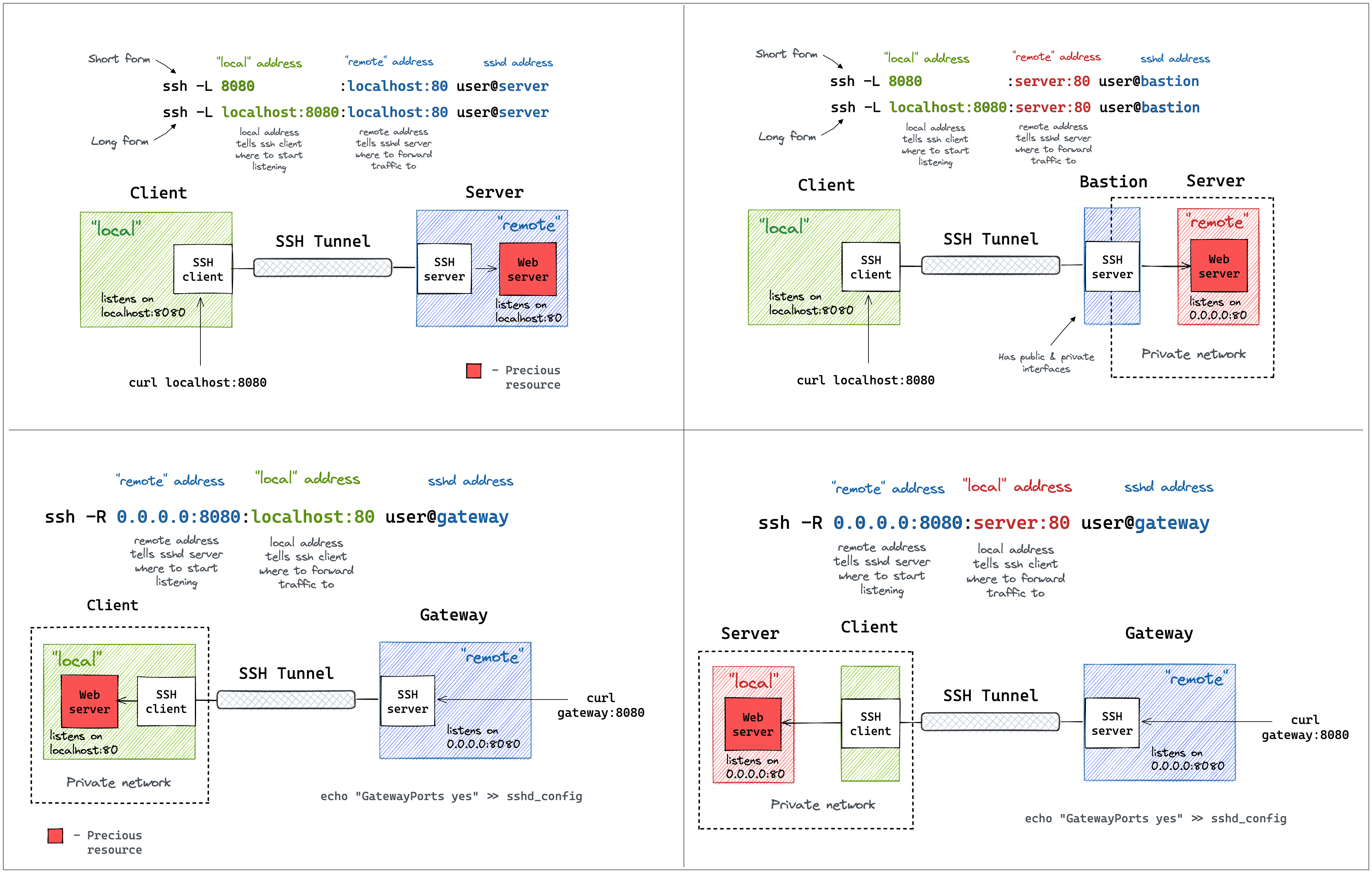
We’ve all seen these great diagrams of how SSH port forwarding works but if your brain is anything like mine, these diagrams leave you with a lot of unanswered questions. If you’re on a red team, understanding how to traverse a network better than the people who designed it gives you immense power to do evil things. SSH is such a powerful tool but sometimes the syntax and other concepts can get in the way of us accomplishing our goals. In an effort to do more evil things in a timely fashion I’ve put together a massive list of SSH things that I find useful. You can read it too, but if I’m being honest, this is mostly for me. I’ve learned that I really don’t grasp concepts unless I have hands on keyboard time doing them. This post is essentially just everything I learned while doing so. Also I should point out that in all of these examples I am using a websever to demonstrate port forwarding but this can be done with almost any service including RDP, SQL, etc.
RIOT is an open-source microcontroller operating system, designed to match the requirements of Internet of Things (IoT) devices and other embedded devices. These requirements include a very low memory footprint (on the order of a few kilobytes), high energy efficiency, real-time capabilities, support for a wide range of low-power hardware, communication stacks for wireless and communication stacks for wired networks.
RIOT provides threading, multiple network stacks, and utilities which include cryptographic libraries, data structures (bloom filters, hash tables, priority queues), a shell and more. RIOT supports a wide range of microcontroller architectures, radio drivers, sensors, and configurations for entire platforms, e.g. Atmel SAM R21 Xplained Pro, Zolertia Z1, STM32 Discovery Boards etc. (see the list of supported boards. Across all supported hardware (32-bit, 16-bit, and 8-bit platforms), RIOT provides a consistent API and enables C and C++ application programming, with multithreading, IPC, system timers, mutexes etc.
A good high-level overview can be found in the article RIOT: An Open Source Operating System for Low-End Embedded Devices in the IoT (IEEE Internet of Things Journal, December 2018).

RIOT powers the Internet of Things like Linux powers the Internet. RIOT is a free, open source operating system developed by a grassroots community gathering companies, academia, and hobbyists, distributed all around the world.
RIOT supports most low-power IoT devices, microcontroller architectures (32-bit, 16-bit, 8-bit), and external devices. RIOT aims to implement all relevant open standards supporting an Internet of Things that is connected, secure, durable & privacy-friendly.
This article shows how to install Python on Red Hat Enterprise Linux (RHEL), including both versions 3 and 2 of Python along with the pip, vent, virtualenv, and pipenv utilities. The article starts with RHEL 9 and continues with RHEL 8 and RHEL 7, including plenty of tips useful in all versions. The article also covers virtual environments, which help you ensure that your applications have the correct versions of Perl and related modules.

You can use Docker with the Dev Containers extension in a few ways:
- Docker installed locally.
- Docker installed on another machine or remote environment.
- You only need Docker installed on the remote host, rather than Docker installed locally.
- Other Docker compliant CLIs, installed locally or in a remote environment.
- For instance, Rancher Desktop is another way to install Docker, providing container management and Kubernetes on Windows, macOS, and Linux.
- Since Rancher Desktop supports Docker CLI via Moby, you can use Dev Containers extension with it. You may learn how to get started in Rancher Desktop's guide.
- Dev Containers interacts with CLIs; it makes no assumptions about how a container engine works and does not interact with container engines or daemons directly.
- Note that other Docker compliant CLIs are not officially supported.
Continue reading to learn alternate ways you can install and use Docker or a Docker compliant CLI.
- VSCode extension: Dev Containers
- GitHub - microsoft/vscode-remote-release: Visual Studio Code Remote Development: Open any folder in WSL, in a Docker container, or on a remote machine using SSH and take advantage of VS Code's full feature set.
- Visual Studio Code Remote Development
- Developing inside a Container using Visual Studio Code Remote Development

jsonschema is an implementation of the JSON Schema specification for Python.

This is an attempt to revive the blog with Hugo. Initially it was running on Github Pages with the default build, using Jekyll. With that, it takes around 120 seconds to build the blog. Using Hugo, we are done in under 10 seconds.
Hugo and Jekyll are static page generators. The blog is written in Markdown, and then transformed by Hugo into HTML. This is being published.

The pytest framework makes it easy to write small, readable tests, and can scale to support complex functional testing for applications and libraries.
pytest requires: Python 3.8+ or PyPy3.
PyPI package name: pytest
pip install pytest
Ich wurde gefragt:
Hast Du eine Idee, wie ich seriös die Kosten für Cloud, reguläres und
selbst Hosting vergleichen kann?
Seriös nicht, weil das ein Problem mit mehreren Schichten ist und keine dieser Schichten irgendwie schön ist.
Rahmenbedingungen
Der Haupttreiber bei der ganzen Sache ist die simple Tatsache, dass wir immer mehr Transistoren auf einen Chip bekommen. Der Chip wird zwar nicht mehr schneller, weil bei circa 3 GHz Takt Dauerleistung Schluss ist, aber weil die Strukturen immer noch kleiner werden bekommen wir immer mehr Cores und Cache.

Fastbin is a drop in replacement of pycasbin the python implementation of the great authorization management casbin.
Fastbin is designed to address the primary concern when working with large sets of rules; Performance.
The root cause of working with large rule sets is the following: casbin/core_enforcer.py#L238
Iterating over 10,000 rules to get a yes or no answer takes time, there really isn't a way around the fact. This limitation comes from the generalization that casbin attempts to support. Independent on the format of your request, or policy definition casbin if able to support your authorization mechanism.
Fastbin makes a minimal set of assumptions to allow efficient filtering of the model so that the number of rules you are iterating over to get a result is much smaller and performance can be maintained. Using Fastbin when working with rule sets of any size, it is possible to keep resolution of enforcement sub millisecond.