


This Docker image provides:
- Asciidoctor 2.0.23
- Asciidoctor Diagram 2.3.1 with ERD and Graphviz integration (supports plantuml and graphiz diagrams)
- Asciidoctor PDF 2.3.17
- Asciidoctor EPUB3 2.1.3
- Asciidoctor FB2 0.7.0
- Asciidoctor Mathematical 0.3.5
- Asciidoctor reveal.js 5.1.0
- AsciiMath
- Source highlighting using Rouge, CodeRay or Pygments
- Asciidoctor Confluence 0.0.2
- Asciidoctor Bibtex 0.9.0
- Asciidoctor Kroki 0.10.0
- Asciidoctor Reducer 1.0.2
This image uses Alpine Linux 3.20.1 as base image.


Test Anything Protocol
TAP, the Test Anything Protocol, is a simple text-based interface between testing modules in a test harness. It decouples the reporting of errors from the presentation of the reports.
One of its major uses is for noise reduction; when you have a suite of many tests, making them TAP producers and using a TAP consumer to view them helps ensures that you will see everything you need to notice and diagnose breakage without being distracted by a flood of irrelevant success messages. It can assist other forms of analysis and statistics-gathering as well.
TAP started life as part of the test harness for Perl but now has implementations in C, C++, Python, PHP, Perl, Java, JavaScript, Go, Rust, and others. Consumers and producers do not have to be written in the same language to interoperate.

Bats: Bash Automated Testing System
Bats is a TAP-compliant testing framework for Bash. It provides a simple way to verify that the UNIX programs you write behave as expected.
A Bats test file is a Bash script with special syntax for defining test cases. Under the hood, each test case is just a function with a description.


ubi8-asciidoctor
A utility image for the UBI8 image + asciidoctor.
Contains the primary used asciidoctor-pdf for generating reports.
It's base is from https://github.com/asciidoctor/docker-asciidoctor but now ubi based.
Purpose
Useful for environments where these libraries/tools are needed such as:
- local development
- CI tools that do not require specific CI tooling configuration, such as GiLab Jobs.
Published
https://quay.io/repository/redhat-cop/ubi8-asciidoctor via GitHub Workflows.

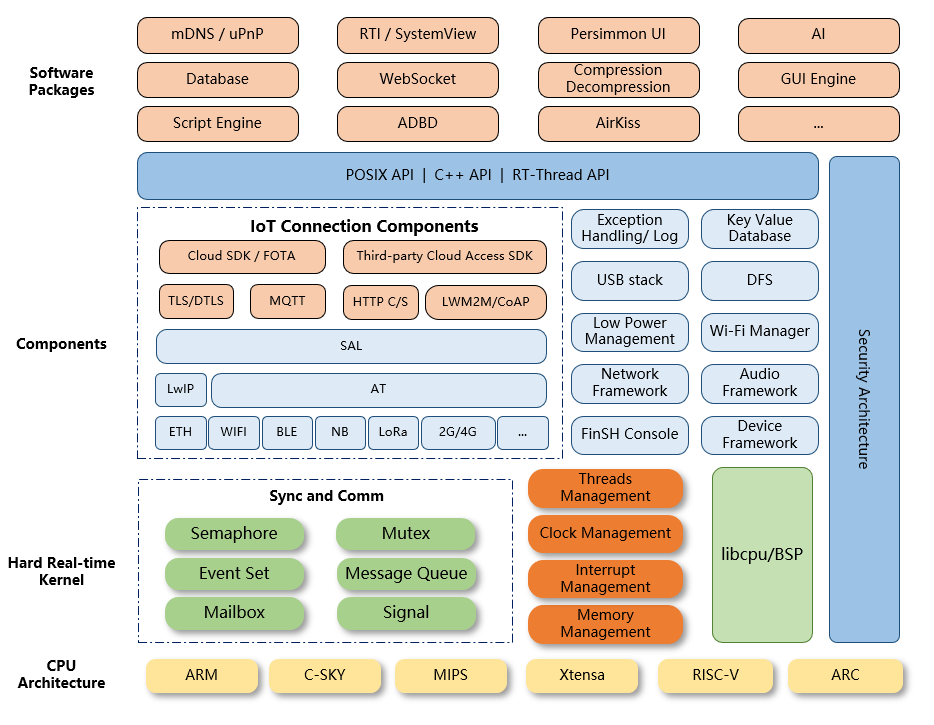
RT-Thread was born in 2006, it is an open source, neutral, and community-based real-time operating system (RTOS).
RT-Thread is mainly written in C language, easy to understand and easy to port(can be quickly port to a wide range of mainstream MCUs and module chips). It applies object-oriented programming methods to real-time system design, making the code elegant, structured, modular, and very tailorable.
RT-Thread has Standard version and Nano version. For resource-constrained microcontroller (MCU) systems, the Nano version that requires only 3KB Flash and 1.2KB RAM memory resources can be tailored with easy-to-use tools. For resource-rich IoT devices, RT-Thread can use the on-line software package management tool, together with system configuration tools, to achieve intuitive and rapid modular cutting, seamlessly import rich software packages; thus, achieving complex functions like Android's graphical interface and touch sliding effects, smart voice interaction effects, and so on.


Links and discussion that helped me, docs and blogs


The K10 data management platform, purpose-built for Kubernetes, provides enterprise operations teams an easy-to-use, scalable, and secure system for backup/restore, disaster recovery, and mobility of Kubernetes applications.
K10’s application-centric approach and deep integrations with relational and NoSQL databases, Kubernetes distributions, and all clouds provides teams the freedom of infrastructure choice without sacrificing operational simplicity. Policy-driven and extensible, K10 provides a native Kubernetes API and includes features such full-spectrum consistency, database integrations, automatic application discovery, multi-cloud mobility, and a powerful web-based user interface.
Given K10’s extensive ecosystem support you have the flexibility to choose environments (public/ private/ hybrid cloud/ on-prem) and Kubernetes distributions (cloud vendor managed or self managed) in support of three principal use cases:
-
Application Mobility
-

JMESPath is a query language for JSON
Enter an expression in the search box to see JMESPath in action.
The expression is evaluated against the JSON data and the result is shown in the result pane.
To learn more about JMESPath, check out the JMESPath Tutorial and JMESPath Examples.


API Connector enables the use of JMESPath, which is a powerful query language for JSON with many useful applications:
- filter for certain fields in the response data
- filter for records that meet specified conditions
- change the report structure, for example to convert columns to rows or normalize JSON
If you just want to filter out fields from your report, you can use API Connector's visual field editor. However, if you're interested in more powerful filtering capabilities, read ahead for information on using JMESPath expressions in your requests.

diceware is a passphrase generator following the proposals of Arnold G. Reinhold on http://diceware.com . It generates passphrases by concatenating words randomly picked from wordlists.
](http://imgs.xkcd.com/comics/password_strength.png)
BlueChi (formerly known as hirte) is a deterministic multi-node service controller.
BlueChi can manage the states of different services across multiple nodes with a focus on highly regulated industries, such as those requiring functional safety. BlueChi integrates with systemd via its D-Bus API and relays D-Bus messages over TCP for multi-nodes support.
On the main node a service called bluechi-controller is running. On startup, the controller loads the configuration files which describe all the involved systems (called nodes) that are expected to be managed. Each node has a unique name that is used to reference it in the controller.
On each managed node that is under control of BlueChi a service called bluechi-agent is running. When the service starts, it connects (via D-Bus over TCP) to the controller and registers as available (optionally authenticating). It then receives requests from the controller and reports local state changes to it.
passt implements a translation layer between a Layer-2 network interface and native Layer-4 sockets (TCP, UDP, ICMP/ICMPv6 echo) on a host. It doesn't require any capabilities or privileges, and it can be used as a simple replacement for Slirp.
disko can either be used after booting from a NixOS installer, or in conjunction with nixos-anywhere if you're installing remotely.
Before using disko, the specifications of the disks, partitions, type of formatting and the mount points must be defined in a Nix configuration. You can find examples of typical configurations in the Nix community repository, and use one of these as the basis of your own configuration.
You can keep your configuration and re-use it for other installations, or for a system rebuild.
disko is flexible, in that it supports most of the common formatting and partitioning options, including:
Disk layouts: GPT, MBR, and mixed.
Partition tools: LVM, mdadm, LUKS, and more.
Filesystems: ext4, btrfs, ZFS, bcachefs, tmpfs, and others.
It can work with these in various configurations and orders, and supports recursive layouts.

I erase my systems at every boot.
Over time, a system collects state on its root partition. This state lives in assorted directories like /etc and /var, and represents every under-documented or out-of-order step in bringing up the services.
“Right, run myapp-init.”These small, inconsequential “oh, oops” steps are the pieces that get lost and don’t appear in your runbooks.
“Just download ca-certificates to … to fix …”Each of these quick fixes leaves you doomed to repeat history in three years when you’re finally doing that dreaded RHEL 7 to RHEL 8 upgrade.
“Oh, touch /etc/ipsec.secrets or the l2tp tunnel won’t work.”
Setting up a new machine is time-consuming, and becomes complicated when it needs to be done remotely. If you're installing NixOS, the nixos-anywhere tool allows you to pre-configure the whole process including:
- Disk partitioning and formatting
- Configuring and installing NixOS
- Installing additional files and software
You can then initiate an unattended installation with a single CLI command. Since nixos-anywhere can access the new machine using SSH, it's ideal for remote installations.
Once you have initiated the command, there is no need to 'babysit' the installation. It all happens automatically.
You can use the stored configuration to repeat the same installation if you need to.


What it is, why we made it, and how it fits into the Nix ecosystem
Zero to Nix is a highly opinionated learning resource for Nix created by Determinate Systems. We believe Zero to Nix fills a major gap for two reasons:
- We find most of the existing Nix documentation to be difficult to navigate for beginners. Sources like the Nixpkgs manual, the official website, Nix Pills, and semi-official sources like nix.dev are all great once you have a strong sense of how Nix works and what it provides. We encourage you to explore them and we even link them in many places in Zero to Nix. But together they can be daunting to the uninitiated, and we wanted to provide a gentle "front end" to the official documentation sources.
- We strongly believe that flakes are the future of Nix and that people onboarding into Nix should use them from the get-go. But flakes are currently marked as an experimental feature of Nix and are thus not discussed in any of the official Nix documentation sources (with the exception of the Wiki entry for flakes).
This is a ported version of the Nix Pills, a series of blog posts written by Luca Bruno (aka Lethalman) and originally published in 2014 and 2015. It provides a tutorial introduction into the Nix package manager and Nixpkgs package collection, in the form of short chapters called ‘pills’.
Since the Nix Pills are considered a classic introduction to Nix, an effort to port them to the current format was led by Graham Christensen (aka grahamc / gchristensen) and other contributors in 2017.
For an up-to-date version, please visit https://nixos.org/guides/nix-pills/. An EPUB version is also available.
