
Kubernetes ist zum Rückgrat der modernen digitalen Infrastruktur geworden – es treibt alles an, von SaaS-Plattformen bis hin zu unternehmenskritischen Systemen im Gesundheitswesen, in der Finanzbranche und in der öffentlichen Verwaltung.
Doch eine Sache wird immer noch weit unterschätzt: Kubernetes allein reicht nicht.
Der Betrieb von Kubernetes in Produktion erfordert weit mehr als das Upstream-Projekt. Du brauchst Netzwerk, Storage, Observability, Security-Hardening, Upgrade-Tooling und operative Prozesse – alles eng integriert und kontinuierlich gepflegt.
Genau hier kommen Kubernetes-Distributionen ins Spiel.
Und wenn du diese Komplexität nicht selbst betreiben möchtest, gibt es eine Abstraktionsebene höher: Managed Kubernetes oder Managed OpenShift.
In diesem Beitrag werfen wir einen Blick auf die Kubernetes-Distributionslandschaft im Jahr 2026 und erklären, warum das Auslagern des Betriebs oft die klügste Wahl ist.



Ein Vortrag über die Entstehung, Entwicklung des Incus Projekts seit 2023 und die Möglichkeiten zur Verwaltung von System Container und virtuellen Maschinen.
Incus ist ein fork des LXD-Projektes, welches viele Jahre als Teil der Linux Container Community entwickelt und gepflegt wurde. Es bezeichnet sich selbst als modernes, sicheres und mächtiges Verwaltungswerkzeug für System Container und virtuelle Maschinen.
Der Vortrag soll einen Überblick zum genannten Projekt verschaffen und klären, wie Incus gegenüber den bekannten Projekten wie Proxmox und XCP-ng einzuordnen ist.
Im ersten Teil meines Vortrags zeige ich u. a. die Möglichkeiten auf, welche Incus bei der Verwaltung von System Container und Virtuellen Maschinen bietet. Hierbei wird auch der Unterschied erklärt zwischen Application Container, System Container und virtuellen Maschinen. Im zweiten Teil meines Vortrags gebe ich einen Überblick, wie sich Incus seit dem initialen Release im Oktober 2023 entwickelt hat und was es noch so rund um Incus gibt bzw. was für 2025 geplant ist. Zum Abschluss wird es natürlich auch eine kurze Demo geben.



I’ve been using NixOS for a while now, primarily to provision my personal and work Mac systems. While Nix can be complex and sometimes challenging to debug, I’ve enjoyed its unique approach to system configuration. However, I haven’t explored much beyond that scope. For some time, I’ve become particularly interested in using it for containers, as NixOS offers compelling features—reproducibility, declarative configuration, and reliable upgrades—which, in theory, make it an excellent choice. How well this theory holds up is something I’m eager to explore further. In this post, I’m documenting my steps for installing NixOS on Proxmox, my chosen virtual environment solution for my home server, as deploying NixOS onto my home server should help me further explore using it for configuring my containers
A self-hosted bookmark manager designed to be minimal, fast, and easy to set up
With ansible-builder you can configure and build portable, consistent, customized Ansible control nodes that are packaged as containers by Podman or Docker. These containers are known as execution environments. You can use them on AWX or Ansible Controller, with Ansible Navigator, for local playbook development and testing, in your CI pipelines, and anywhere else you run automation.
You can design and distribute specialized execution environments for your Ansible content, choosing the versions of Python and ansible-core you want, and installing only the Python packages, system packages, and Ansible collections you need for your tasks.

Incus is a next-generation system container, application container, and virtual machine manager.
It provides a user experience similar to that of a public cloud. With it, you can easily mix and match both containers and virtual machines, sharing the same underlying storage and network.
Incus is image based and provides images for a wide number of Linux distributions. It provides flexibility and scalability for various use cases, with support for different storage backends and network types and the option to install on hardware ranging from an individual laptop or cloud instance to a full server rack.
When using Incus, you can manage your instances (containers and VMs) with a simple command line tool, directly through the REST API or by using third-party tools and integrations. Incus implements a single REST API for both local and remote access.
The Incus project was created by Aleksa Sarai as a community driven alternative to Canonical's LXD.
Today, it's led and maintained by many of the same people that once created LXD.

kaniko is a tool to build container images from a Dockerfile, inside a container or Kubernetes cluster.
Important
This is a supported replacement of the original GoogleContainerTools/kaniko repository, which was archived in June of 2025. Further details in History and Status.
kaniko doesn't depend on a Docker daemon and executes each command within a Dockerfile completely in userspace. This enables building container images in environments that can't easily or securely run a Docker daemon, such as a standard Kubernetes cluster.
kaniko is meant to be run as an image. We do not recommend running the kaniko executor binary in another image, as it might not work as you expect - see Known Issues.
This article explains how to install a Samba v4 Active Directory domain controller in a Docker container. This post is part of my series on home automation, networking & self-hosting that shows how to install, configure, and run a home server with dockerized or virtualized services.

uCore is an OCI image of Fedora CoreOS with "batteries included". More specifically, it's an opinionated, custom CoreOS image, built daily with some common tools added in. The idea is to make a lightweight server image including commonly used services or the building blocks to host them.
Please take a look at the included modifications, and help us improve uCore if the project interests you.


The next generation Linux workstation, designed for reliability, performance, and sustainability.






This project is now known as “libostree”, though it is still appropriate to use the previous name: “OSTree” (or “ostree”). The focus is on projects which use libostree’s shared library, rather than users directly invoking the command line tools (except for build systems). However, in most of the rest of the documentation, we will use the term “OSTree”, since it’s slightly shorter, and changing all documentation at once is impractical. We expect to transition to the new name over time.
As implied above, libostree is both a shared library and suite of command line tools that combines a “git-like” model for committing and downloading bootable filesystem trees, along with a layer for deploying them and managing the bootloader configuration.
The core OSTree model is like git in that it checksums individual files and has a content-addressed-object store. It’s unlike git in that it “checks out” the files via hardlinks, and they thus need to be immutable to prevent corruption. Therefore, another way to think of OSTree is that it’s just a more polished version of Linux VServer hardlinks.
Features:
- Transactional upgrades and rollback for the system
- Replicating content incrementally over HTTP via GPG signatures and “pinned TLS” support
- Support for parallel installing more than just 2 bootable roots
- Binary history on the server side (and client)
- Introspectable shared library API for build and deployment systems
- Flexible support for multiple branches and repositories, supporting projects like Flatpak which use libostree for applications, rather than hosts.
-
Container-based
The optimal container host will be offered in order to run containerized
applications. -
Secure
Our goal is to provide the best container host to run workloads securely
and at scale. -
Open-source Ecosystem
Everything is supported by a totally free and open-source Fedora
ecosystem. -
Open to everyone
CoreOS is currently available on multiple platforms, with more coming
soon. -
Minimal
The Fedora CoreOS image is kept minimal by design.
-
Flexible
There are a wide variety of supported installation methods.


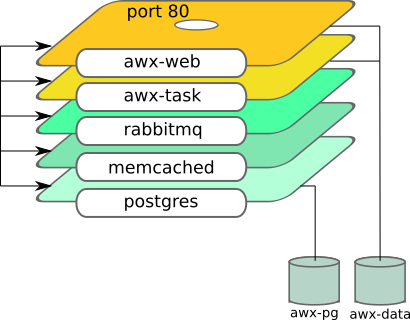
This Ansible role sets up Ansible AWX server using containers. It uses podman to do it.
See this blog how to use it: Automate Podman Containers with Ansible 2/2
Role dependency



The official Nextcloud installation method. Nextcloud AIO provides easy deployment and maintenance with most features included in this one Nextcloud instance.
Included are:
- Nextcloud
- High performance backend for Nextcloud Files
- Nextcloud Office (optional)
- High performance backend for Nextcloud Talk and TURN-server (optional)
- Nextcloud Talk Recording-server (optional)
- Backup solution (optional, based on BorgBackup)
- Imaginary (optional, for previews of heic, heif, illustrator, pdf, svg, tiff and webp)
- ClamAV (optional, Antivirus backend for Nextcloud)
- Fulltextsearch (optional)
- Whiteboard (optional)
- Docker Socket Proxy (optional, needed for Nextcloud App API)
- Community containers

Let’s talk about Docker and Nix today. Before explaining what Nix is, if you don’t know yet, and before going into the details, I will show you a snippet similar to a Dockerfile for creating a Redis image equivalent to the one in docker hub.
The final image will be around 42mb (or 25mb) in size, compared to 177mb.
EDIT: as mentioned on HN, alpine-based images can even go around 15mb in size.
If you want to try this, the first step is to install Nix.
Podman can run rootless containers and be a drop-in replacement for Docker.
Dieser Artikel gibt meine Motivation für den Bau von Container-Images und die Vorgehensweise wieder und zeigt, wie ich mit Buildah meine OCI-kompatiblen Container-Images erstelle.
Es handelt sich dabei mehr um einen Erfahrungsbericht als ein Tutorial und ich erhebe keinen Anspruch auf Vollständigkeit. Das behandelte Beispiel ist jedoch zum Einstieg und zur Nachahmung für all jene geeignet, die Container ausführen können und diese gerne ohne Verwendung von Containerfiles bauen möchten.


You can use Docker with the Dev Containers extension in a few ways:
- Docker installed locally.
- Docker installed on another machine or remote environment.
- You only need Docker installed on the remote host, rather than Docker installed locally.
- Other Docker compliant CLIs, installed locally or in a remote environment.
- For instance, Rancher Desktop is another way to install Docker, providing container management and Kubernetes on Windows, macOS, and Linux.
- Since Rancher Desktop supports Docker CLI via Moby, you can use Dev Containers extension with it. You may learn how to get started in Rancher Desktop's guide.
- Dev Containers interacts with CLIs; it makes no assumptions about how a container engine works and does not interact with container engines or daemons directly.
- Note that other Docker compliant CLIs are not officially supported.
Continue reading to learn alternate ways you can install and use Docker or a Docker compliant CLI.
- VSCode extension: Dev Containers
- GitHub - microsoft/vscode-remote-release: Visual Studio Code Remote Development: Open any folder in WSL, in a Docker container, or on a remote machine using SSH and take advantage of VS Code's full feature set.
- Visual Studio Code Remote Development
- Developing inside a Container using Visual Studio Code Remote Development

Niolesk
Edit diagrams from textual descriptions! : A kroki interface.
- Application : https://niolesk.top/
- Project page : https://github.com/webgiss/niolesk/
- Container image : ghcr.io/webgiss/niolesk (static site served by nginx)
Description
Provide an interface for https://kroki.io/
Just add any kroki url after the url of niolesk followed by # and you'll be able to edit the diagram, and export again a new url after change.