Create awesome docs the easy way!
docToolchain is a collection of scripts that makes it easy to create and maintain powerful technical documentation. Built on best-of-breed open source technologies, we deliver the best docs toolchain so you don’t have to.



GNSS RTK Base stations

The Perl Maven tutorial will teach you the basics of the Perl programming language. You'll be able to write simple scripts, analyze log files and read and write CSV files. Just to name a few common tasks.
You'll learn how to use CPAN and several specific CPAN modules.
It will be a good foundation for you to build on.
If you are interested in getting updated when new parts are published, please subscribe to the newsletter.
There is also an e-book version of the material available for purchase. In addition to the tutorial, the eBook also includes some material that is only available pro subscribers.
You can serve calendars in ICal format from your web application on-the fly or you can save it to the disk as an *.ical file and serve the static file. Then people can add it to their calendar application and see the events you list.
The modules in use:
Data::ICal
Data::ICal::Entry::Event
DateTime
DateTime::Duration
DateTime::Format::ICal
This code generates two events. The first one has a beginning and ending date. The second one has a beginninng and a duration. It also includes a link to Zoom as the "location".
Welcome to the Git crash course for SVN users! This introduces you to Git based on your current Subversion knowledge. If you want to migrate your company from SVN to Git, see the SVN migration page. If you want a list of common commands, see the Git Cheat Sheet (or the git-svn guide if you are using Git as a subversion client. Many non-SVN-specific guides are also available. This crash course is based on Pasky's unmaintained version.


- + Erstklassige Bildqualität
- + Rosbust und Wasserdicht auch ohne Gehäuse
- + hohe Akkulaufzeit
- - schwer
- - unglücklicher Druckpunkt
VSCodeVim is a Vim emulator for Visual Studio Code.
- 🚚 For a full list of supported Vim features, please refer to our roadmap.
- 📃 Our change log outlines the breaking/major/minor updates between releases.
- Report missing features/bugs on GitHub.

Based on a discussion on IRC and Mastodon: “How can I get access to the return values of my (Python-) programs functions?” And more generally, how can I trace function execution in Python, showing function parameters and return values?
- decorator
- autologging
- icecream
- snoop and birdseye
- peepshow, a commandline debugger
- Honeycomb and Opentracing



The main branch is currently the future Python 3.12, and is the only branch that accepts new features. The latest release for each Python version can be found on the download page.
k3s ist eine schlanke Variante zum vollen Kubernetes (k8s) Stack. Der k3s Cluster lässt sich daher mit wenigen Schritten installieren und einrichten. Dieses Tutorial beschreibt dir wie du den k3s Cluster installieren kannst.
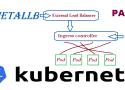
Running a Kubernetes Cluster in your own data center on Bare Metal hardware can be lots of fun but also can be challenging. One of the changeless are exposing your service to an external Load Balancer, Kubernetes does not offer an implementation of an external load-balancer for bare metal cluster implementations. The Kubernetes implementations of Network Load Balancers are only available on specific Cloud Providers like AWS, GCP, Azure, etc.. and is enabled by specifying the –cloud-provider= option. leaving a gap/challenge if you create your own Bare Metal Kubernetes Cluster. While their are many workarounds to address this issue most of them are not perfect and have their own list of challenges. while I was looking for a for a solution, most recently came across a project called MetalLB, at first I was quite sceptical if its going to work, but after testing this for a while I have to say, I am quite happy with the solution.
In this post we’ll look at how ingress works in a K3s cluster. For background, I recommend reading the Networking Section of the K3s documentation.
Ingress Overview
K3s automatically deploys the Traefik Ingress Controller and provides a service load balancer called Klipper.
The Gateway API project is the successor to the Ingress API. However, it does not include the Ingress resource (the closest parallel is the HTTPRoute). As a result, a one-time conversion from your existing Ingress resources to the relevant Gateway API resources is necessary.
This guide will help you with the conversion. It will:
- Explain why you may want to switch to the Gateway API.
- Describe the key differences between the Ingress API and the Gateway API.
- Map Ingress features to Gateway API features.
- Show an example of an Ingress resource converted to Gateway API resources.
- Mention ingress2gateway for automatic conversion.
At the same time, it will not prepare you for a live migration or explain how to convert some implementation-specific features of your Ingress controller. Additionally, since the Ingress API only covers HTTP/HTTPS traffic, this guide does not cover the Gateway API support for other protocols.

git filter-repo is a versatile tool for rewriting history, which includes capabilities I have not found anywhere else. It roughly falls into the same space of tool as git filter-branch but without the capitulation-inducing poor performance, with far more capabilities, and with a design that scales usability-wise beyond trivial rewriting cases. git filter-repo is now recommended by the git project instead of git filter-branch.
While most users will probably just use filter-repo as a simple command line tool (and likely only use a few of its flags), at its core filter-repo contains a library for creating history rewriting tools. As such, users with specialized needs can leverage it to quickly create entirely new history rewriting tools.
BorgBackup (short: Borg) is a deduplicating backup program. Optionally, it supports compression and authenticated encryption.
The main goal of Borg is to provide an efficient and secure way to backup data. The data deduplication technique used makes Borg suitable for daily backups since only changes are stored. The authenticated encryption technique makes it suitable for backups to not fully trusted targets.
See the installation manual or, if you have already downloaded Borg, docs/installation.rst to get started with Borg. There is also an offline documentation available, in multiple formats.

The Settings editor is the UI that lets you review and modify setting values that are stored in a settings.json file. You can review and edit this file directly by opening it in the editor with the Preferences: Open Settings (JSON) command. Settings are written as JSON by specifying the setting ID and value.

PuTTY is a free (MIT-licensed) Windows Telnet and SSH client. This manual documents PuTTY, and its companion utilities PSCP, PSFTP, Plink, Pageant and PuTTYgen.
Note to Unix users: this manual currently primarily documents the Windows versions of the PuTTY utilities. Some options are therefore mentioned that are absent from the Unix version; the Unix version has features not described here; and the pterm and command-line puttygen and pageant utilities are not described at all. The only Unix-specific documentation that currently exists is the man pages.
This manual is copyright 1997-2022 Simon Tatham. All rights reserved. You may distribute this documentation under the MIT licence. See appendix D for the licence text in full.

i3lock is a popular X11 screen lock utility. As far as customization goes, it only allows one to set a background from a PNG file. This limitation is part of the design of i3lock: its primary goal is to keep the screen locked, something difficult enough with X11. Each additional feature would increase the attack surface and move away from this goal. Many are frustrated with these limitations and extend i3lock through simple wrapper scripts or by forking it.
The first solution is usually safe, but the second goes against the spirit of i3lock.
XSecureLock is a less-known alternative to i3lock. One of the most attractive features of this locker is to delegate the screen saver feature to another process. This process can be anything as long it can attach to an existing window provided by XSecureLock, which won’t pass any input to it. It will also put a black window below it to ensure the screen stays locked in case of a crash.
XSecureLock is shipped with a few screen savers, notably one using mpv to display photos or videos, like the Apple TV aerial videos. I have written my own saver using Python and GTK.
It shows a background image, a clock, and the current weather.